What Is Phishing-Resistant MFA And Why Password-Based Authentication Is No Longer Enough

Quick Answer
Phishing-resistant MFA is an authentication method that uses secure factors like security keys, biometrics, or passkeys to prevent credential theft. It is more secure than password-based authentication, which is vulnerable to phishing, credential stuffing, and account takeover attacks.
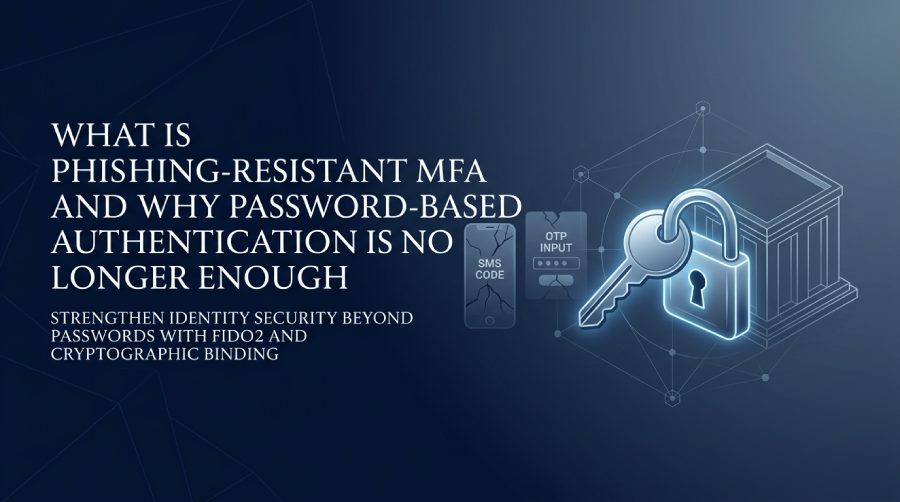
For a long time, passwords have served as the bedrock of online security; however, they fall short in combating today’s advanced phishing schemes, credential theft, and account takeovers. Even conventional multi-factor authentication (MFA) is at risk, as attackers can utilize advanced tactics to intercept codes, exploit push notifications, or navigate around authentication processes. Consequently, more organizations are turning to phishing-resistant MFA — an authentication method fortified by cryptographic measures that safeguard users from inadvertently giving access to cybercriminals.
This guide will delve into the concept of phishing-resistant MFA, its distinctions from traditional MFA, the underlying technologies, and ways organizations can enhance identity security and phishing protection within Microsoft Entra ID and Microsoft 365 ecosystems.
The Limits of Password-Based Authentication in Today’s Threat Landscape
Password-based authentication was never designed for today’s cybersecurity reality. Passwords can be guessed, reused, leaked, sprayed, stolen through malware, or captured in adversary-in-the-middle phishing kits. Even when organizations enforce complexity rules, passwords remain a shared secret—and shared secrets are inherently vulnerable.
This is especially risky in Microsoft 365 and Microsoft Entra environments, where one compromised identity can expose email, SharePoint data, Teams conversations, cloud apps, and administrative controls. In Entra ID, formerly Azure AD, attackers often target user identities with broad access, privileged administrative roles, and directory roles such as Global Administrator, Authentication Administrator, Conditional Access Administrator, Exchange Administrator, SharePoint Administrator, User Administrator, Security Administrator, Helpdesk Administrator, Password Administrator, Privileged Authentication Administrator, Privileged Role Administrator, Application Administrator, Cloud Application Administrator, and Billing Administrator.
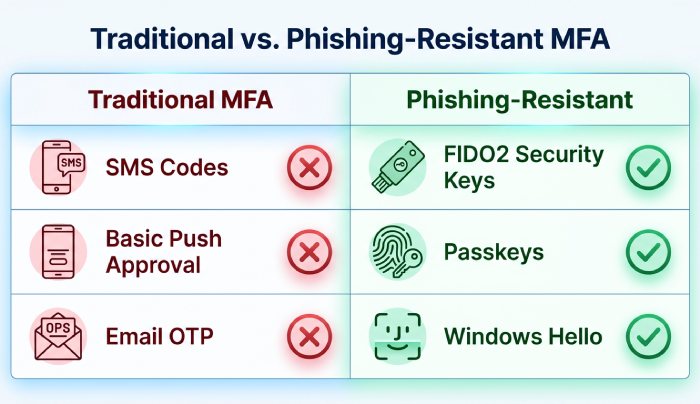
Traditional multi-factor authentication improves security, but it does not automatically solve phishing. A weak MFA policy may still allow authentication methods that attackers can intercept or manipulate. If an organization relies on legacy MFA, such as SMS codes or basic push approvals, the authentication strength may be insufficient for sensitive workloads.
Modern identity security requires more than “something you know.” It requires phishing-resistant MFA, strong conditional access, and an MFA policy that maps authentication strength to business risk.
What Phishing-Resistant MFA Means and How It Differs from Traditional MFA
Phishing-resistant MFA is a form of multi-factor authentication designed so that users cannot accidentally give attackers a reusable credential, code, or approval token. Unlike traditional MFA, phishing-resistant multifactor authentication validates the legitimacy of the website or service requesting authentication before completing the sign-in.
In Microsoft Entra ID, phishing-resistant MFA is closely tied to authentication strength. An authentication strength defines which authentication methods satisfy a conditional access policy. Microsoft provides built-in authentication strengths, and administrators can also create a custom authentication strength when they need more precise control.
Traditional MFA vs. phishing-resistant multifactor authentication
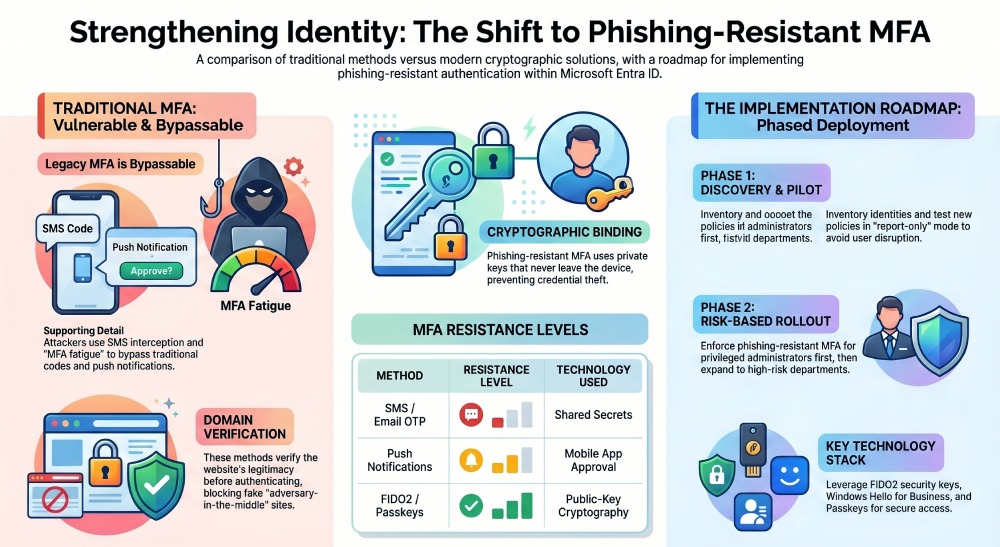
Traditional multi-factor authentication often depends on codes, prompts, or shared secrets. These methods can reduce risk, but they can still be phished. Phishing-resistant multifactor authentication uses cryptographic validation between the authenticator, browser, device, and relying party. The authenticator will not complete authentication for a fake site because the request is bound to the legitimate domain.
This is why phishing-resistant MFA is different from legacy MFA. Legacy MFA may ask, “Did the user provide a second factor?” Phishing-resistant MFA asks, “Was the authentication completed through a trusted, cryptographically bound method for the correct service?”
For Microsoft Entra, the practical result is stronger sign-in protection, better control over target resources, and reduced exposure to credential theft campaigns.
Authentication strength and Conditional Access
Conditional Access is where organizations enforce risk-based identity decisions. A conditional access policy can scope to users, include or exclude users and groups, target resources such as cloud apps, and determine whether to grant access, block access, or require authentication strength.
For example, an MFA policy may require phishing-resistant MFA for privileged administrative roles, while allowing another authentication strength for lower-risk scenarios. In Entra ID, administrators can test the policy impact using report-only mode before they enable policy enforcement.
This staged approach reduces the chance of policy misconfiguration and protects the user experience while moving away from legacy MFA.
Core Technologies Behind Phishing-Resistant MFA: FIDO2, WebAuthn, Passkeys, and Hardware Security Keys
The core technologies behind phishing-resistant multifactor authentication are based on public-key cryptography. Instead of sharing a password or one-time code, the authenticator proves possession of a private key that never leaves the device.
FIDO2 and WebAuthn
FIDO2 is a standard developed to support passwordless and phishing-resistant authentication. WebAuthn is the browser-based API that enables websites and identity providers, including Microsoft Entra ID, to use FIDO2 credentials.
Together, FIDO2 and WebAuthn allow passwordless MFA through hardware security keys, platform authenticators, and passkeys. These methods bind authentication to the legitimate service, making phishing-resistant MFA far more secure than legacy MFA.
Passkeys, Windows Hello for Business, and security keys
Passkeys are a major step toward passwordless MFA. They allow users to authenticate with biometrics, device PINs, or security keys while relying on asymmetric cryptography behind the scenes. Windows Hello for Business is another important phishing-resistant MFA option for Microsoft environments, especially for managed Windows devices joined to Microsoft Entra ID.
Hardware security keys, such as FIDO2 keys, are especially valuable for privileged users, administrators, and high-risk accounts. Many experts in the Microsoft identity community—including Jonathan Edwards, Andy Malone, MVP, John Savill’s Technical Training, Managed Technology Channel by ITS, Xerillion, Threatscape, and ITS content on YouTube—regularly emphasize the importance of stronger authentication methods for administrators and sensitive workloads.
Temporary Access Pass for onboarding
A temporary access pass can help users register passwordless MFA methods without relying on weak initial passwords. This is useful during onboarding for a new user account, device replacement, or recovery scenarios. In the Entra ID admin center, administrators can use a temporary access pass as part of the prep work required to migrate from legacy MFA to phishing-resistant MFA.
Why SMS Codes, OTPs, and Push Notifications Can Still Be Phished or Bypassed
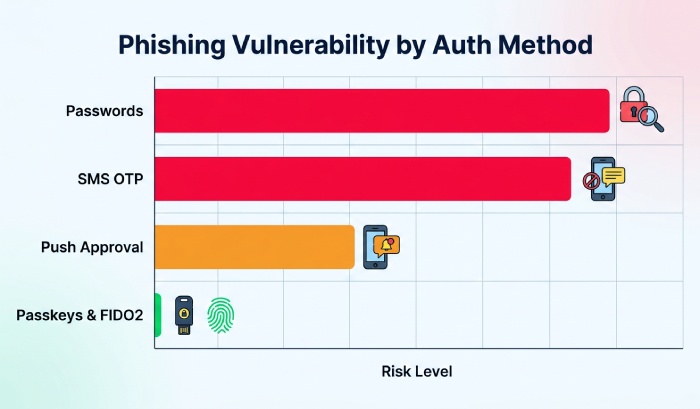
SMS codes, email OTPs, phone calls, and push notifications are better than passwords alone, but they are not the same as phishing-resistant multifactor authentication. Attackers can trick users into entering OTPs into fake login pages. They can also use real-time proxy attacks to capture sessions after a user completes multi-factor authentication.
Push-based legacy MFA is also vulnerable to MFA fatigue attacks. In these attacks, users receive repeated approval prompts until they approve one by mistake. If the MFA policy accepts simple push approval as sufficient authentication strength, attackers may gain access even though multi-factor authentication was technically used.
This is why organizations should not treat all authentication methods as equal. An authentication strength based on phishing-resistant MFA should be required for high-value apps, administrative portals, privileged identity management, and sensitive data.
In Microsoft Entra ID, this is especially important for role activation through Privileged Identity Management, also known as PIM. When users activate privileged administrative roles, a conditional access policy can require authentication strength based on phishing-resistant MFA. This helps ensure that role activation is protected by stronger security policies rather than legacy MFA prompts.
How Organizations Can Adopt Phishing-Resistant MFA Without Disrupting Users
Successful adoption is not just a technical rollout. It requires planning, communication, testing, and phased enforcement. The goal is to increase authentication strength without creating unnecessary friction for employees.
Start with discovery and prep work
Before enforcing phishing-resistant MFA, organizations should inventory user identities, workload identities, service accounts, service principals, managed identities, privileged users, and cloud apps. Workload identities and service principals may not use human MFA, but they still require strong governance, credential hygiene, and conditional access controls where applicable.
Administrators should review existing MFA policy settings, legacy MFA usage, registered authentication methods, and current conditional access policy assignments. This prep work helps identify users who need passkeys, Windows Hello for Business, hardware security keys, or a temporary access pass.
Pilot with report-only mode
A smart approach is to create a conditional access policy in report-only mode first. Report-only mode allows teams to measure policy impact before enforcement. This helps detect policy misconfiguration, identify unsupported authentication methods, and protect the user experience.
The policy can scope to users in pilot groups, target resources such as Microsoft 365 admin portals or sensitive cloud apps, and require authentication strength. Administrators should carefully exclude users and groups where appropriate, including an emergency access account or break-glass account.
A break-glass account, also called an emergency access account, should be tightly monitored and excluded from certain conditional access controls to prevent lockout during outages. However, it should still be protected through strong security policies, alerting, and operational governance.
Phase enforcement by risk
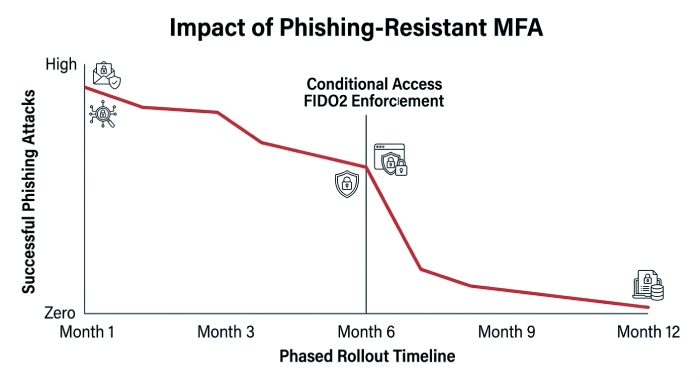
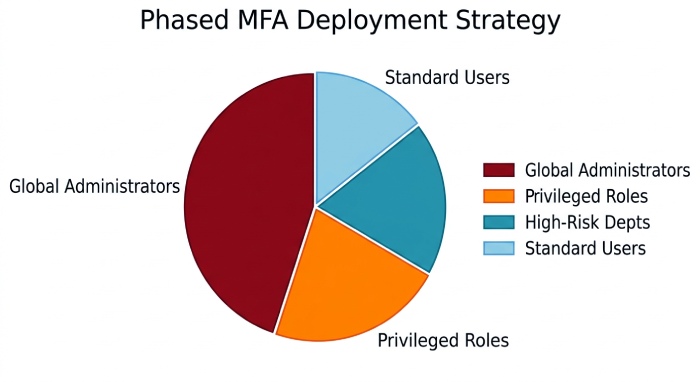
Organizations do not need to move everyone to passwordless MFA on day one. A practical roadmap is to require phishing-resistant MFA first for privileged administrative roles, then expand to high-risk departments, executives, finance users, and finally the broader workforce.
In Microsoft Entra, administrators can create a custom authentication strength or use built-in authentication strengths to align with business needs. For example, a conditional access policy might require phishing-resistant multifactor authentication for Global Administrator and Privileged Role Administrator access, while another MFA policy supports passwordless MFA for standard employees.
The same model can apply across home tenant and resource tenant scenarios. In cross-tenant collaboration, organizations should understand where authentication occurs, what authentication strength is trusted, and how conditional access evaluates the session.
Use the admin center to migrate from legacy MFA
The Entra ID admin center provides the controls needed to migrate from legacy MFA to phishing-resistant MFA. Administrators can review authentication methods, configure FIDO2 security keys, enable passkeys where supported, deploy Windows Hello for Business, configure a temporary access pass, and build a conditional access policy that requires authentication strength.
A recommended sequence is:
- Inventory legacy MFA usage.
- Register users for passwordless MFA.
- Create a pilot conditional access policy.
- Test in report-only mode.
- Validate policy impact.
- Exclude users and groups only where operationally necessary.
- Enable policy enforcement in phases.
By aligning MFA policy, conditional access, and authentication strength, organizations can move beyond password-dependent security and adopt phishing-resistant multifactor authentication in a way that improves protection without disrupting everyday work.
General Manager
General Manager of DuoCircle. Product strategy and commercial lead across DuoCircle's 2,000+ customer base.
LinkedIn Profile →Protect your inbox from phishing attacks
Real-time email security with 60-day free trial. No credit card required.