What Is Email Bombing? How To Detect And Prevent Inbox Flooding Attacks

Quick Answer
Email bombing is an attack that floods an inbox with large volumes of unwanted messages to disrupt communication or hide suspicious activity. Detect it by spotting sudden email spikes and unusual account alerts. Prevent attacks with email filters, multifactor authentication, and account monitoring.
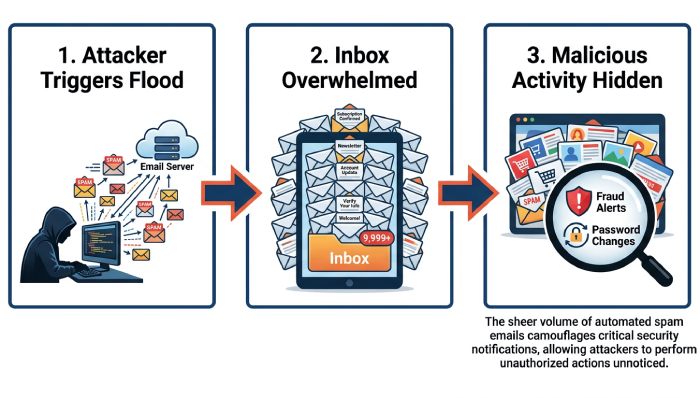
Email bombing is a deliberate attempt to overwhelm a person’s or organization’s mailbox with a sudden surge of messages. The goal may be disruption, harassment, distraction, or concealment of more serious unauthorized activity. In a typical email bomb attack, the victim receives hundreds or thousands of emails in minutes, making it difficult to find legitimate messages such as fraud alerts, password changes, security alerts, or a payment confirmation.
An email bomb attack is sometimes called a spam bomb, mail bomb attack, or email flooding attack. While the terms are often used interchangeably, they can describe different techniques: a spam bomb may rely on junk messages, subscription bombing abuses newsletter and account sign-up forms, and a mail bomb attack may involve very large messages or repeated delivery attempts.
Security teams should treat email bombing as more than a nuisance. An inbox flood can be used to hide account takeover activity, suspicious transactions, bank account activity, an order receipt from Retailers, or account recovery attempts. Reports from organizations and researchers such as Guardian Digital, WIRED, ProPublica, MITRE, HHS, and university IT groups including Columbia University and LDEO IT have highlighted how inbox abuse can intersect with phishing emails, credential theft, and fraud.
How Inbox Flooding Attacks Work
The mechanics of an inbox flood
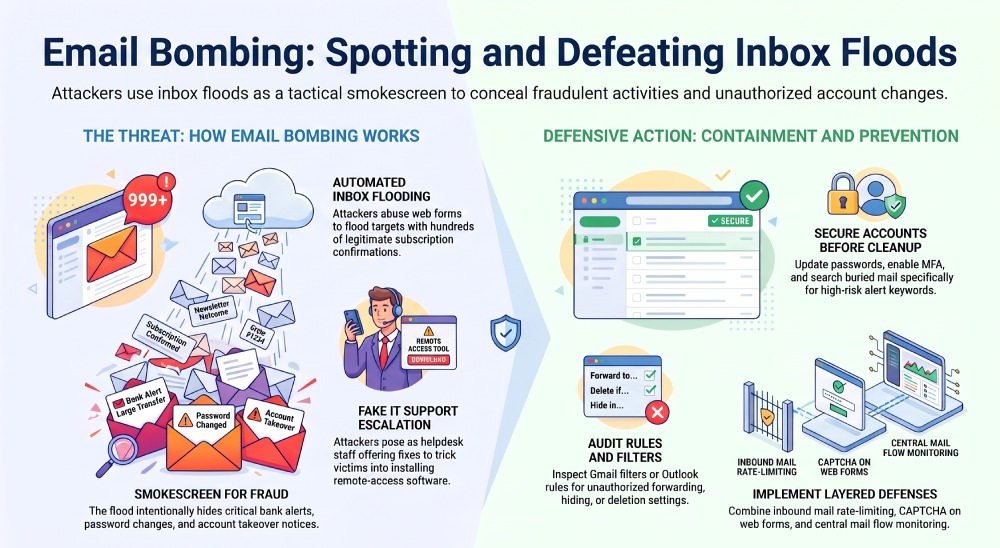
An inbox flood usually begins when an attacker submits the victim’s email address to a large number of sign-up forms, contact pages, forums, or Newsletter domains. This creates automated subscription signups and floods the inbox with Signup confirmation messages, welcome emails, and unwanted subscriptions.
In Gmail, Outlook, Google Workspace, or a Microsoft 365 mailbox, these messages may land across the Inbox, Spam, Trash, All Mail, and Quarantine areas depending on filtering decisions. Attackers count on volume: the email flooding makes it harder for the victim to notice fraud alerts, unauthorized activity, or account recovery emails from Payment services, Banks, or Retailers.
Why attackers use email bombing
Attackers often use email bombing as a smokescreen. While the victim is distracted by a spam bomb, the attacker may attempt password changes, add forwarding and filters, connect malicious connected apps, or modify POP/IMAP settings. In Microsoft 365 and Outlook, an attacker may create an Outlook rule that hides security alerts or routes messages to archived messages. In Gmail, a malicious Gmail filter can skip the inbox, mark messages as read, or send important notices to Trash.
Email bombing may also accompany fake IT support scams. In this pattern, the attacker creates an inbox flood and then contacts the victim through email, phone, Teams, or another channel while posing as fake IT support. The fake IT support actor may claim they can “fix” the email flooding if the user installs remote-access software or a Remote-access application. That can lead to device compromise and a broader account takeover.
High-risk scenario: email flood plus remote access
A dangerous email bomb attack occurs when email bombing is paired with social engineering. The attacker creates the inbox flood, sends phishing emails, and then appears as fake IT support. If the user grants remote-access software permissions, the attacker may access Mailboxes, browser sessions, password vaults, and business applications.
What this often indicates
When email flooding and fake IT support appear together, assume possible unauthorized activity until proven otherwise. Preserve incident records, check sign-in logs, and start device-containment procedures if there are signs of device compromise.
Common Types of Email Bombing Attacks: Subscription Bombs, Mass Mail Floods, and Harassment Campaigns
Subscription bombing
Subscription bombing is one of the most common forms of email bombing. Attackers abuse sign-up forms to enroll the target in hundreds of newsletters, promotions, and online services. The result is a subscription bombing wave filled with sign-up confirmation emails, unsubscribe links, and unwanted subscriptions.
A subscription bombing campaign may look harmless at first because many messages come from legitimate Newsletter domains. However, the real purpose may be to bury fraud alerts, hide suspicious transactions, or conceal unauthorized activity on a Google Account, bank account, or Payment services profile.
Mass mailing and spam bomb campaigns
A spam bomb may involve mass mailing from compromised mail servers, botnets, or disposable accounts. Unlike subscription bombing, the messages may be pure junk, scams, or phishing emails. A spam bomb can also include spoofed senders, misleading subjects, and repeated messages designed to degrade productivity.
In enterprise environments, mail flow monitoring and flood detection are essential because email flooding can affect more than one user. If attackers target a distribution list, weak Distribution-list permissions can turn one mail bomb attack into a company-wide disruption. Microsoft Support and Google support documentation both emphasize reviewing mail rules, suspicious sign-ins, and filtering behavior when abnormal email volume appears.
Attachment flooding, reply-all storms, and harassment
A mail bomb attack may also rely on attachment flooding, where large files or repeated attachments consume mailbox storage and slow down mail clients. Another related problem is a reply-all storm, where many users respond to a broad distribution list, creating unintentional email flooding.
Harassment campaigns are more personal. In these cases, email bombing may be used to intimidate, embarrass, or exhaust the target. Whether the event is a spam bomb, subscription bombing, or targeted harassment, the operational effect is the same: an inbox flood that prevents the user from seeing important security alerts, fraud alerts, and evidence of unauthorized activity.
Warning Signs and Detection Methods: How to Spot an Email Bombing Attack Early
Early indicators in the mailbox
The clearest sign of an email bomb attack is a sudden spike in incoming messages. Watch for hundreds of Signup confirmation emails, newsletters, coupon offers, forum registrations, and account notices within a short period. In Gmail, review Inbox, Spam, Trash, and All Mail. In Outlook and Microsoft 365, check the inbox, spam folder, rules, archived messages, and quarantine folder.
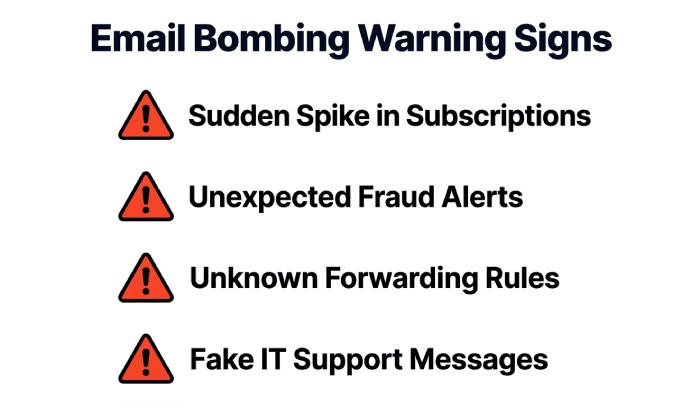
Other warning signs include:
- Unexpected fraud alerts from Banks or Payment services
- Payment confirmation or order receipt messages you do not recognize
- Security alerts for password changes or account recovery
- Messages about forwarding and filters you did not create
- New connected apps linked to your Google Account or Microsoft 365 mailbox
- Phishing emails mixed into the inbox flood
- Fake IT support messages offering to stop the email flooding
An email bomb attack should raise concern if it appears alongside suspicious transactions, bank account activity, or other unauthorized activity. Attackers often hope the flood will cause the victim to delete important alerts during bulk cleanup.
Technical detection methods
Security teams should use mail flow monitoring, rate limits, and managed email security tools to identify unusual delivery patterns. Filtering services can detect spikes by sender domain, message type, sending infrastructure, and recipient volume. In Google Workspace and Microsoft 365, administrators should review sign-in logs, rule creation events, mailbox audit logs, and Quarantine results.
For individual users, a Security Checkup is critical. Google’s Security Checkup can help review connected apps, recovery options, and account activity. Microsoft 365 administrators can inspect mailbox rules, risky sign-ins, and changes to forwarding and filters. In both platforms, look for a Gmail filter or Outlook rule designed to hide fraud alerts, bank notifications, or security alerts.
Immediate Response Steps: What to Do When Your Inbox Is Being Flooded
Contain the attack before cleaning up
Do not start by randomly deleting messages. During an inbox flood, important fraud alerts, payment confirmation emails, order receipt notices, or account recovery warnings may be buried in the noise.
Take these steps first:
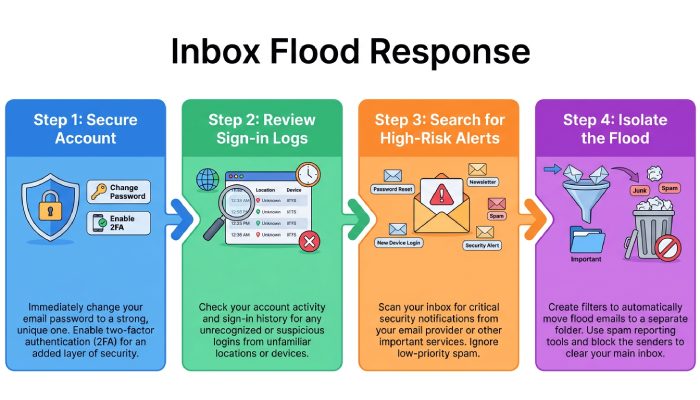
- Secure the account. Change your password from a clean device, enable multifactor authentication, and use unique passwords.
- Check for account takeover signs. Review sign-in logs, password changes, connected apps, POP/IMAP access, forwarding and filters, and any unknown Gmail filter or Outlook rule.
- Search for high-risk alerts. Look for terms such as “fraud,” “password,” “payment,” “order,” “bank,” “recovery,” and “unauthorized activity.”
- Create a temporary label or folder. In Gmail, use a temporary label; in Outlook, create a folder to separate the flood from reviewed unwanted mail.
- Avoid unsafe unsubscribe links. Some unsubscribe links are legitimate, but phishing emails may use them to confirm your address or steal credentials.
- Preserve evidence. Keep samples, headers, timestamps, sender domains, and incident records for IT or security review.
For organizations, open a security ticket immediately. If fake IT support contacted the user or remote-access software was installed, treat it as potential device compromise and begin device containment. If a distribution list is involved, review Distribution-list permissions and consider temporary moderation.
Prevention and Protection Strategies: Filters, MFA, Monitoring, and User Awareness
Build layered defenses against email bombing
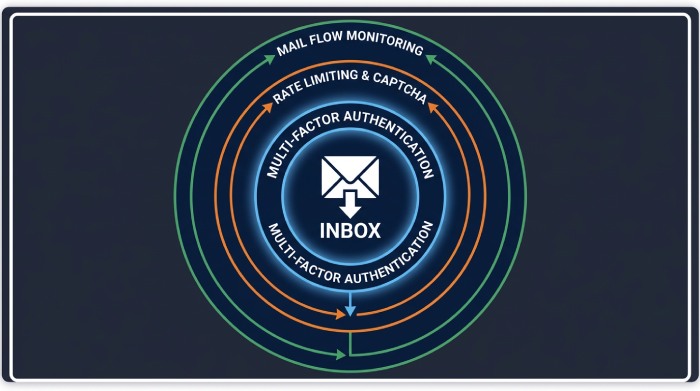
Preventing email bombing requires both technical controls, phishing protection, and user awareness. No single Gmail filter, Outlook rule, or blocklist will stop every email bomb attack, but layered controls reduce the impact of a spam bomb, subscription bombing wave, or mail bomb attack.
Recommended controls include:
- Multifactor authentication on Gmail, Google Workspace, Outlook, Microsoft 365, banking, and Payment services accounts
- Unique passwords stored in a reputable password manager
- Managed email security and filtering services with flood detection capabilities
- Rate limits for inbound mail, sign-up forms, and web forms
- Blocklist controls for abusive Newsletter domains and repeat senders
- Quarantine policies for suspicious mass mailing and attachment flooding
- Mail flow monitoring for abnormal recipient volume or sudden delivery spikes
- Review of forwarding and filters to catch hidden exfiltration or alert suppression
- Security Checkup routines for Google Account users and mailbox audits for Microsoft 365 users
User training should specifically cover fake IT support. Employees should know that legitimate Microsoft Support, Google, internal help desks, or Teams administrators will not ask them to install remote-access software unexpectedly during an inbox flood. If fake IT support appears during email flooding, users should stop interacting, report the event, and contact IT through a verified channel.
Organizations should also harden public-facing sign-up forms with CAPTCHA, confirmation controls, throttling, and abuse detection to reduce automated subscription signups. For internal collaboration platforms, review distribution list ownership, Teams notification behavior, and mail routing rules. Finally, establish a response playbook that includes quarantine folder review, archived message searches, Spam and Trash checks, bulk cleanup guidance, and procedures for preserving incident records before deleting unwanted mail.
General Manager
General Manager of DuoCircle. Product strategy and commercial lead across DuoCircle's 2,000+ customer base.
LinkedIn Profile →Protect your inbox from phishing attacks
Real-time email security with 60-day free trial. No credit card required.