Email Threat Triage: How To Identify And Prioritize Suspicious Messages

Quick Answer
Email threat triage helps identify and prioritize suspicious messages by evaluating sender authenticity, links, attachments, email headers, and potential risks. This process enables security teams to detect phishing, prevent malware, and respond to high-risk emails quickly.
Email threat triage is the structured process of reviewing, classifying, prioritizing, and responding to suspicious messages before they become business-impacting incidents. In a modern security operations center, the SOC analyst must quickly determine whether an email is benign spam, a phishing attempt, credential theft, malware delivery, vendor email compromise, or part of a broader phishing campaign.
Effective email threat triage matters because email remains one of the most common entry points for attackers, making phishing protection essential for identifying and mitigating malicious messages before they cause harm. Malicious emails may impersonate Google, DocuSign, OneDrive, finance teams, executives, or trusted vendors. Some attempt to steal an MFA token, while others deliver malware attachments or redirect users to credential-harvesting pages. Without a repeatable phishing triage process, a SOC analyst can spend too much time on low-risk messages while critical alerts wait in the email triage queue.
A mature email threat triage program supports alert volume reduction by filtering noise, reducing the false positive rate, and helping teams focus on the malicious emails that pose the highest risk. It also improves threat investigation by giving analysts a consistent way to assess threat signals, assign a verdict, and coordinate remediation. Platforms such as Microsoft Sentinel, Splunk, SOAR tools, SIEM platforms, Radiant Security, Abnormal, StrongestLayer, Security Inbox, KillPhish, TRACE, and Inbox Advisor can support centralized triage, detection and response, and automated enrichment.
The Role of User-Reported Phishing
User-reported phishing is one of the most valuable inputs in email threat triage. Employees often notice suspicious messages before automated tools do, especially when an attacker uses business context, social engineering, or compromised vendor accounts. Reports may arrive through an abuse mailbox, phishing mailbox, help desk ticket, browser plugin, or reporting tool.
However, user-reported phishing also creates scale challenges. Security teams may receive hundreds or thousands of reported messages per week, including legitimate newsletters, spam detection misses, phishing simulation emails from tools such as PhishingBox or AI Phishing Coach, and genuinely malicious emails. This is where phishing triage, AI-powered automation, and alert volume reduction become essential.
Key Indicators of Suspicious Emails: Sender, Links, Attachments, and Language
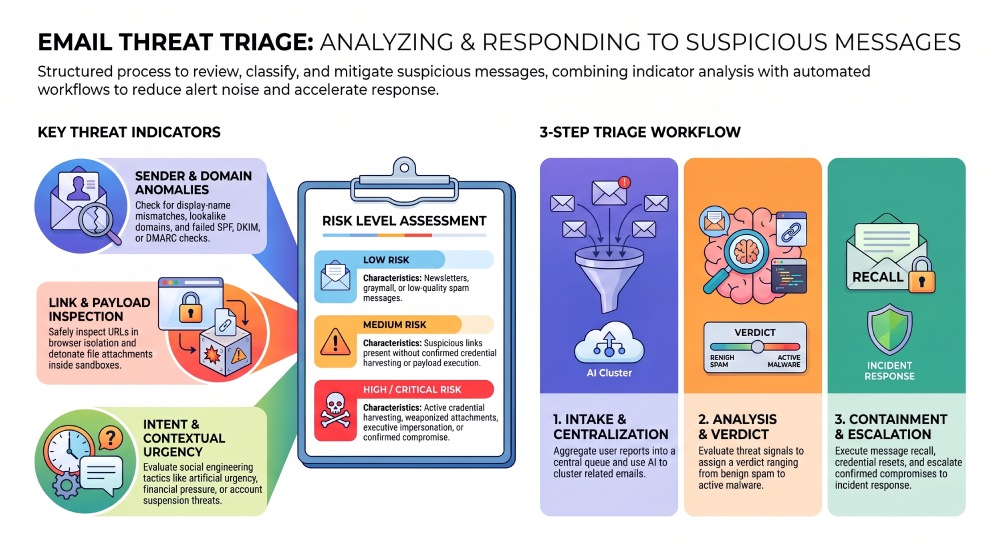
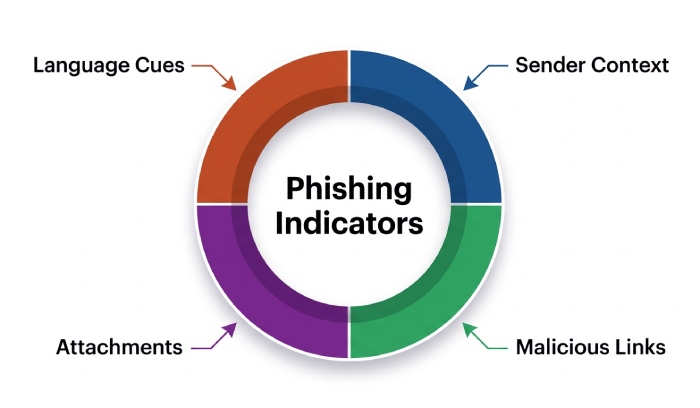
A strong phishing investigation starts with indicator review. The SOC analyst should evaluate sender information, email attributes, URLs, attachments, authentication results, behavioral analysis, and user responses. No single signal is definitive; the goal is to combine multiple threat signals into a defensible verdict.
Sender and Domain Signals
Sender information is often the first clue. Analysts should check display-name mismatches, newly registered domains, lookalike domains, reply-to anomalies, and failed SPF, DKIM, or DMARC checks. A domain lookup can reveal whether the sender infrastructure is recently created, associated with prior abuse, or connected to blocklist indicators.
Vendor email compromise is especially difficult because the sender may appear legitimate. In those cases, phishing triage should consider historical communication patterns, invoice changes, unusual payment requests, and whether the message is part of a broader phishing campaign. Campaign correlation across reported messages helps determine whether the organization is seeing isolated spam or coordinated malicious emails.
Link, Attachment, and Payload Review
Links should be expanded and safely inspected in a sandbox or browser isolation environment. Watch for URL shorteners, redirect chains, typo-squatted domains, fake Microsoft 365 or Google login pages, and OneDrive or DocuSign lures. Malware attachments require special handling; analysts should avoid opening files directly and instead rely on detonation, hash reputation, file metadata, and endpoint telemetry.
AI models and LLM-based tools can accelerate this investigation process by summarizing message intent, extracting indicators, and grouping similar emails. Still, the SOC analyst should validate AI findings, especially when AI-powered automation recommends quarantine, bulk remediation, or escalation.
Language and Social Engineering Cues
Suspicious messages often use urgency, fear, secrecy, or financial pressure. Examples include “your account will be disabled,” “approve payment immediately,” “review secure document,” or “MFA-token expired.” Poor grammar is no longer a reliable indicator because attackers use LLM tools to write polished messages. Instead, email threat triage should focus on intent, context, and deviations from normal business behavior.
Common Red Flags to Prioritize
High-risk red flags include credential-harvesting links, malware attachments, executive impersonation, payment diversion, fake shared documents, MFA fatigue prompts, and messages targeting privileged users. These should move quickly through phishing triage and into incident response when user interaction is confirmed.
Classifying Email Threats by Risk Level and Business Impact
Classification categories help security teams prioritize suspicious messages consistently. A practical model includes benign, spam, suspicious, phishing, malware, business email compromise, and confirmed compromise. Each verdict should reflect technical evidence and business impact.
Risk Levels for Email Threat Triage
Low-risk messages may include newsletters, graymail, or obvious spam. Medium-risk messages may contain suspicious links but no confirmed credential harvesting or malware. High-risk messages include malicious emails with active phishing pages, weaponized attachments, or attempts to steal credentials. Critical alerts involve confirmed compromise, executive targeting, financial fraud, or widespread exposure across the organization.
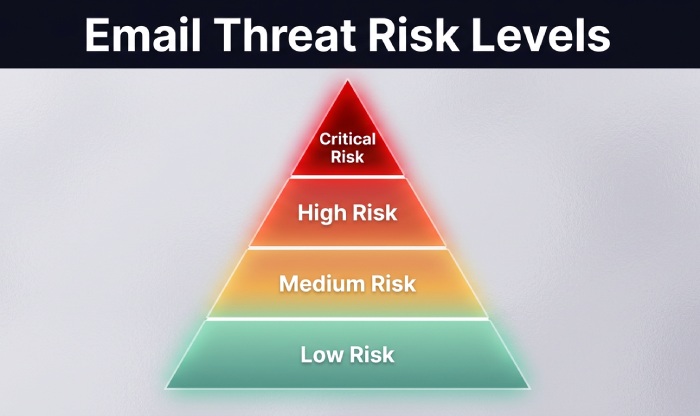
Business impact should influence priority. A phishing campaign sent to 5,000 employees is more urgent than a single low-quality spam message. A malicious email sent to finance, IT administrators, or executives deserves immediate threat investigation. Email threat triage should also account for whether users clicked links, entered credentials, downloaded files, or forwarded the email internally.
MITRE Mapping and Campaign Context
MITRE mapping can help align email threats with known attacker tactics and techniques, such as phishing for initial access, credential access, and execution through attachments. Campaign correlation across SIEM data, Microsoft Sentinel, Splunk, endpoint logs, and mail gateway telemetry enables a SOC analyst to identify repeated infrastructure, shared subjects, identical URLs, or common sender domains.
This context improves alert volume reduction because related reported messages can be grouped under one phishing campaign rather than handled as separate tickets. It also supports bulk remediation, faster quarantine decisions, and better response coordination between the SOC, help desk, legal, and business stakeholders.
Step-by-Step Triage Workflow for Security Teams and End Users
A clear triage workflow ensures that every suspicious message is handled consistently, whether it comes from user-reported phishing, a mail gateway alert, SIEM integration, or a third-party email security platform.
1. Intake and Centralized Triage
All reported messages should flow into a centralized triage location, such as a phishing mailbox, abuse mailbox, SOAR queue, ticketing system, or email triage queue. Tools like Radiant Security, Abnormal, StrongestLayer, KillPhish, Security Inbox, and TRACE can enrich reports and reduce manual effort. Integrations using REST API, CEF, or LEEF formats can send events into Microsoft Sentinel, Splunk, or another SIEM.
Centralized triage gives the SOC analyst a single source of truth and supports alert volume reduction by deduplicating similar reports. AI-powered automation can cluster related emails, extract indicators, recommend a verdict, and route critical alerts for human review.
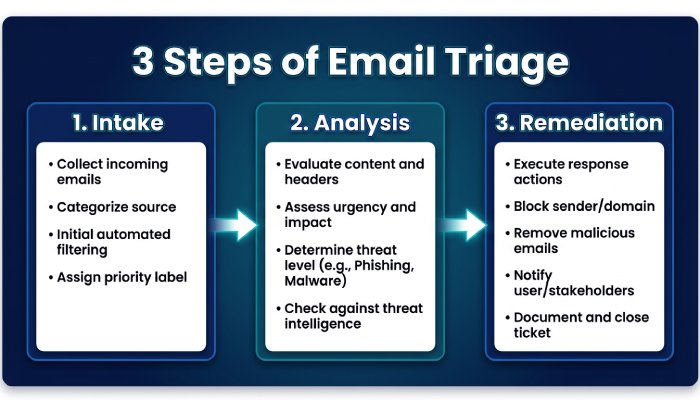
2. Analyze Indicators and Assign a Verdict
The SOC analyst should review sender information, URLs, attachments, headers, authentication results, domain reputation, and user responses. The phishing investigation should determine whether the message is benign, spam, suspicious, or malicious. If the message matches known blocklist indicators or active threat intelligence from Threat Hunt activities, it should be escalated quickly.
AI-powered automation can speed up this stage, but the SOC analyst remains accountable for the final verdict. Overreliance on automation can increase the false positive rate or miss nuanced vendor email compromise attempts.
3. Contain, Remediate, and Escalate
Once malicious emails are confirmed, remediation should happen quickly. Common actions include quarantine, message recall, URL blocking, attachment hash blocking, mailbox search, credential reset, MFA session revocation, and endpoint isolation. Bulk remediation is especially important when campaign correlation shows that a phishing campaign reached many inboxes.
If a user clicked a link, entered credentials, or opened malware attachments, the case should move from phishing triage into incident response. Response coordination may involve the SOC, IT, help desk, identity team, legal, and communications. This ensures containment, eradication, recovery, and business communication happen in parallel.
Best Practices for Escalation, Documentation, and Continuous Improvement
Strong email threat triage depends on repeatable documentation and measurable improvement. Every threat investigation should capture the message source, classification categories, indicators, verdict, affected users, remediation actions, and escalation path. Ticketing records should include why the SOC analyst made a decision, which systems were searched, and whether related malicious emails were found.
Escalation Rules and Playbooks
Escalation should be based on risk, not just volume. Critical alerts should include confirmed credential theft, malware execution, financial fraud, privileged-user targeting, or a phishing campaign affecting many employees. Playbooks should define when to involve incident response, when to notify leadership, and when to trigger security orchestration actions through SOAR.
For consistent detection and response, organizations should document playbooks for user-reported phishing, malware attachments, vendor email compromise, and suspicious messages that require deeper behavioral analysis. Lane Billings and analyst communities on G2 and Gartner frequently emphasize that process maturity matters as much as tooling.
Measuring Triage Effectiveness
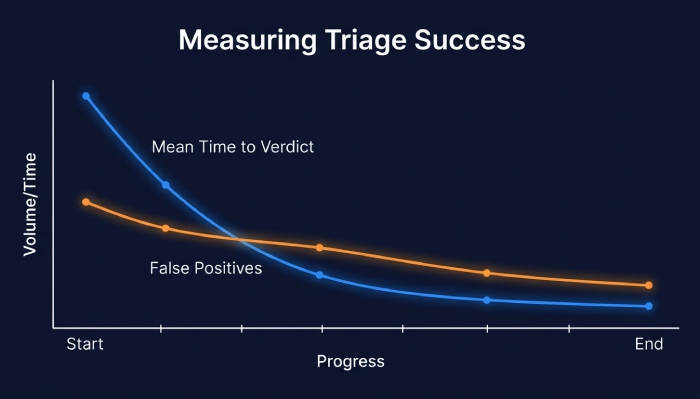
Triage effectiveness should be measured through mean time to verdict, mean time to remediation, false positive rate, user reporting rate, percentage of malicious emails removed, and alert volume reduction. Security awareness training should reinforce what users should report, while phishing simulation campaigns help evaluate user responses and reporting behavior.
AI-powered automation can improve email threat triage by summarizing evidence, enriching indicators, prioritizing malicious emails, and recommending remediation. But the best results come when AI models support—not replace—the SOC analyst. A balanced phishing triage program combines automation, human judgment, MITRE-aligned analysis, SIEM integration, and continuous feedback from every threat investigation.
General Manager
General Manager of DuoCircle. Product strategy and commercial lead across DuoCircle's 2,000+ customer base.
LinkedIn Profile →Protect your inbox from phishing attacks
Real-time email security with 60-day free trial. No credit card required.