How Do Malicious LNK Files Turn Phishing Emails Into Malware Infections?

Quick Answer
Malicious LNK files turn phishing emails into malware infections by disguising harmful Windows shortcuts as legitimate attachments. When opened, these files execute malicious commands, download malware, and compromise systems, potentially enabling data theft and unauthorized access.
LNK files are Microsoft Windows shortcut files used to point users to another resource, such as an application, document, folder, network share, or URL. These shortcut files commonly appear as desktop shortcuts on the Desktop, Start Menu, taskbar, or inside File Explorer. When a user clicks one, Windows follows the shell links metadata to locate and launch the referenced object.
The .lnk file extension is associated with this shortcut behavior. A normal shortcut might open Microsoft Edge, a Firefox browser profile, VLC media player, a PDF, a TXT document, or a JPEG image. Users create these Windows shortcut files through actions such as Create shortcut, Paste shortcut, or Send to Desktop. They can also inspect file properties through the Properties dialog or Properties window, where the Target field and Start in field reveal the target location and execution context.
Attackers abuse this trust model because Windows shortcut files are not simple text pointers. They are a binary file format with a rich file structure capable of storing paths, arguments, icons, metadata, and embedded execution instructions. That flexibility makes malicious LNK files attractive for malware delivery, especially in phishing campaigns where the attacker wants a victim to initiate file execution with a single click.
Inside the binary file structure
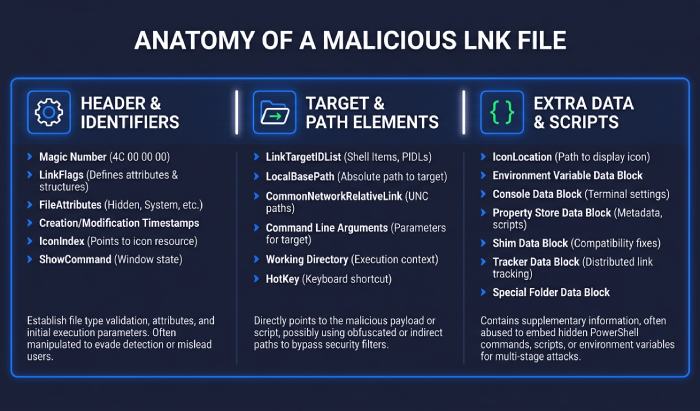
A shortcut’s file structure includes a header field, flags, path data, and optional metadata. Analysts often use tools such as 010 Editor to inspect the binary file format behind the .lnk file extension and understand how LNK malware hides its behavior.
Header and identifiers
The file header can include CLSID and GUID values that identify the file as a Windows shell link. These fields help Microsoft Windows interpret the item as a virtual link rather than an ordinary document.
Target and path elements
LNK files may contain LINKTARGET_IDLIST data made up of shell items such as a ROOT item, VOLUME item, and FILE ENTRY elements. These can point toward My Computer, a Volume, a shell folder, Program Files (x86), or another target location. They may also include RELATIVE_PATH values to make shortcut files work even when moved between folders or systems.
Strings and extra data
The STRING_DATA and EXTRA_DATA sections may include descriptions, icon references, working directories, and COMMAND_LINE_ARGUMENTS. Those command-line arguments are frequently abused in malicious LNK files because they can pass instructions to legitimate Windows utilities. This is where in-argument scripts often appear: script logic is placed directly inside the shortcut parameters instead of being stored as a separate script file.
How Phishing Emails Deliver Malicious LNK Attachments or Links
Attachments, archives, and cloud-hosted lures
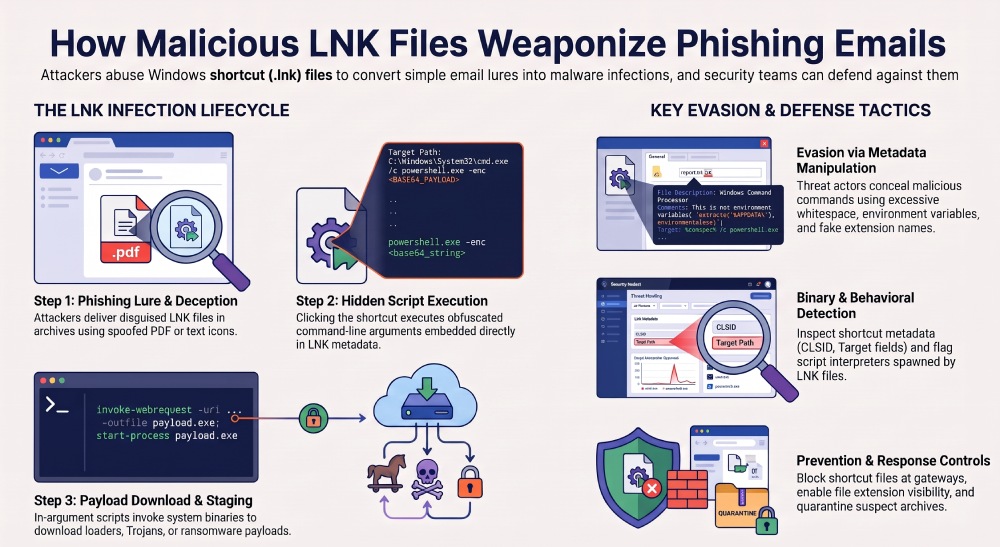
Phishing emails turn malicious LNK files into malware delivery tools by disguising them as routine business content. A message may claim to contain an invoice, shipping document, HR form, scanned PDF, or shared folder. The actual attachment may be a ZIP archive containing shortcut files with the .lnk file extension, or the email may link to a cloud-hosted download where the victim retrieves the LNK malware.
This file distribution model helps attackers bypass basic email filters. Instead of attaching an obvious executable, they deliver Windows shortcut files that appear harmless or familiar. In some campaigns, the shortcut files use icon spoofing to masquerade as legitimate files, such as a PDF icon, a TXT document icon, or a JPEG image preview. This file masquerading is especially effective when Windows hides known extensions, making the .lnk file extension less visible to the user.
Social engineering and interface trust
Malicious LNK files often rely on familiar Windows behavior. In File Explorer on Windows 11, users expect desktop shortcuts and shell links to open destinations quickly. Attackers exploit that expectation by naming LNK malware something like “Invoice.pdf.lnk” or “Meeting Notes.txt.lnk.” The file may display a PDF-like icon while hiding the true target location in file properties.
For organizations, this is where phishing protection becomes important: the email lure, attachment handling, URL filtering, and user training all influence whether the victim ever reaches the point of file execution. Without layered controls, malicious LNK files can become a low-friction path from inbox to malware distribution.
The Infection Chain: From Click to Script Execution and Payload Download
Step 1: User interaction triggers file execution
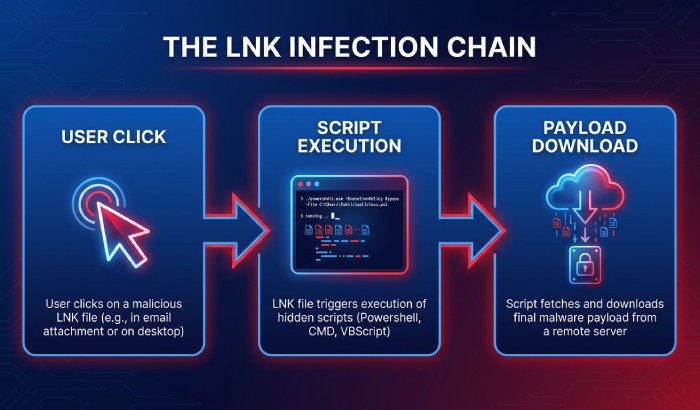
The infection chain begins when the recipient opens the attachment or clicks the downloaded shortcut. That action triggers file execution through the Windows shell. The user thinks they are opening a PDF, folder, or image, but the shortcut files instead invoke a system component, script engine, or trusted binary.
This is why malicious LNK files are so dangerous: they convert a social engineering event into exploit execution without requiring a traditional software vulnerability. In many cases, the “exploit” is the misuse of trusted Windows functionality. Historical vulnerabilities such as CVE-2010-2568 showed how shortcut handling itself could be weaponized, but modern LNK malware often succeeds through deception, command-line arguments, and living-off-the-land execution techniques.
Step 2: In-argument scripts and command abuse
The Target field may contain commands that launch utilities and pass hidden instructions through COMMAND_LINE_ARGUMENTS. These in-argument scripts can be encoded, fragmented, or padded with benign-looking text. The shortcut’s Start in field may also be configured to control the working directory and influence payload execution.
Attackers use in-argument scripts because they reduce the need to drop an obvious script file at the beginning of the attack. The logic needed for exploit execution can be embedded directly into the shell links metadata. From there, the LNK malware may execute a malicious batch file, run a script interpreter, or invoke a trusted process to retrieve the next stage.
Step 3: Payload download and staging
After initial file execution, the malicious LNK files typically initiate payload download from an attacker-controlled server or compromised website. The downloaded component may be a loader, credential stealer, remote access trojan, ransomware precursor, or post-exploitation framework.
At this stage, malware delivery shifts from the shortcut itself to broader payload execution. The LNK malware acts as the initial access mechanism, while later stages support persistence, credential theft, lateral movement, and other post-exploitation activities. Security teams often find evidence of this chain in proxy logs, DNS telemetry, endpoint process trees, and antivirus scanning results.
Common Evasion Tactics Used by Malicious LNK Files
Masquerading, icon spoofing, and overlays
One of the most common evasion techniques is icon spoofing. Attackers configure shell links to display icons associated with Microsoft Edge, VLC media player, PDF readers, folders, or image files. This helps malicious LNK files masquerade as legitimate files and encourages victims to double-click them.
Some campaigns also use overlay execution concepts, where visible content or decoy files distract the user while hidden commands run in the background. For example, the shortcut may open a harmless document while simultaneously initiating malware delivery. This reduces suspicion because the victim sees something expected after file execution.
Obfuscated paths and arguments
Attackers manipulate file properties to hide suspicious behavior. Long command-line arguments, excessive whitespace, environment variables, and encoded strings can conceal in-argument scripts. LNK malware may also use RELATIVE_PATH values or unusual target location settings so the shortcut works across different systems.
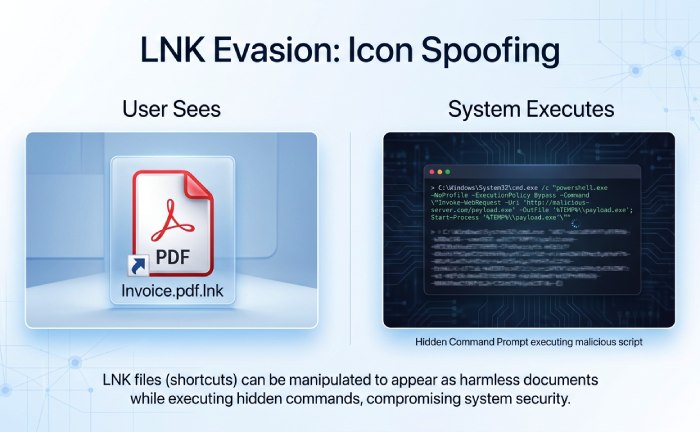
Because the .lnk file extension supports complex metadata, malicious LNK files can contain misleading STRING_DATA, suspicious EXTRA_DATA, and buried COMMAND_LINE_ARGUMENTS. These fields are useful for threat detection, but they also give attackers room to hide execution techniques.
Abuse of trusted Windows behaviors
Not every LNK-based attack depends on a software flaw. Many rely on the fact that Microsoft Windows treats shortcut files as normal productivity artifacts. Desktop shortcuts, shell links, and Windows shortcut files are so common that users rarely inspect them. This makes the format ideal for malware distribution and phishing-driven exploit execution.
Attackers may also submit samples to public scanning services or check VirusTotal detections to refine their LNK malware. If antivirus scanning flags the file, they can adjust the icon, file structure, strings, or command-line arguments until fewer engines detect it.
How to Detect, Block, and Respond to LNK-Based Phishing Attacks
Email, endpoint, and network detection
Effective threat detection requires visibility across email, endpoint, and network layers. Email security tools should inspect archives, identify shortcut files, expose the .lnk file extension, and analyze file properties rather than relying only on displayed names or icons. Endpoint tools should flag suspicious file execution where Windows shortcut files spawn script interpreters, command shells, or network utilities.
Security teams can use machine learning detection to identify abnormal shell links, unusual COMMAND_LINE_ARGUMENTS, and suspicious payload download behavior. Products and research from Palo Alto Networks and Unit 42 frequently highlight how phishing campaigns use malicious LNK files for initial access. Controls such as a Next-Generation Firewall, Advanced WildFire, Prisma Access, Advanced Threat Prevention, Cortex XDR, XSIAM, and SASE architectures can contribute telemetry and enforcement across the attack chain.
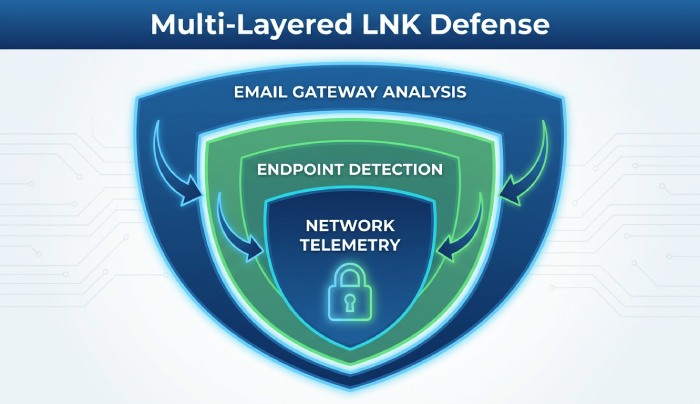
Defensive analysis workflow
Analysts should treat unexpected shortcut files as executable content. In a sandbox or isolated lab, they can inspect the binary file format, parse LINKTARGET_IDLIST, examine shell items, review ROOT item and VOLUME item paths, and validate FILE ENTRY records. Tools such as 010 Editor help reveal hidden file structure details, including header field values, CLSID, GUID, STRING_DATA, and EXTRA_DATA.
The Properties dialog can provide quick triage, but it is not enough. The Target field, Start in field, target location, and command-line arguments should be extracted and normalized. If in-argument scripts are present, analysts should decode them safely and trace whether they perform payload download, call a malicious batch file, or trigger further exploit execution.
Response and threat prevention priorities
When LNK malware is discovered, responders should block the sender, remove related emails, quarantine downloaded shortcut files, and hunt for similar file distribution patterns. They should also search endpoint telemetry for file execution events involving suspicious shortcut files, script interpreters, unexpected child processes, and outbound connections.
Threat prevention should include blocking malicious LNK files at email gateways, restricting risky script execution, showing file extensions in File Explorer, and training users to distrust documents that unexpectedly arrive as shortcut files. Antivirus scanning remains useful, but it should be paired with behavioral analytics, machine learning detection, sandboxing, and network controls to stop malware delivery before payload execution leads to post-exploitation activities.
General Manager
General Manager of DuoCircle. Product strategy and commercial lead across DuoCircle's 2,000+ customer base.
LinkedIn Profile →Protect your inbox from phishing attacks
Real-time email security with 60-day free trial. No credit card required.