Phishing Link Scanner: How To Detect And Block Malicious URLs

Quick Answer
A phishing link scanner checks URLs for malicious indicators, suspicious domains, phishing pages, malware, and scams. It helps users verify links, identify threats, and block unsafe URLs before they compromise accounts or sensitive information.
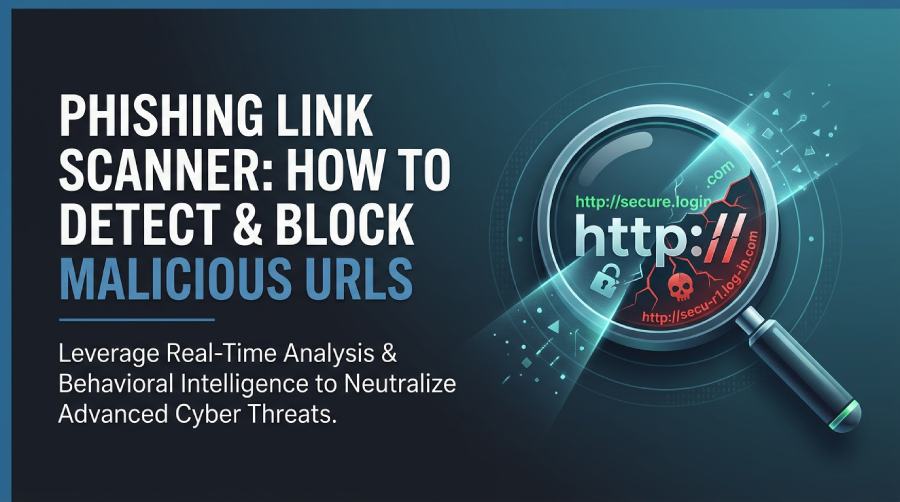
A phishing link scanner is a security tool that inspects URLs to determine whether they lead to malicious websites, credential-harvesting pages, malware downloads, or other unsafe destinations. It works like a phishing link checker, URL safety checker, and scam website checker combined: users submit a link, and the tool returns a risk verdict based on reputation data, technical signals, and behavioral analysis.
Phishing remains one of the most common entry points for identity theft prevention failures, ransomware, account takeover, and business email compromise. Attackers often use malicious links in emails, text messages, social media posts, QR codes, and collaboration tools to redirect users to a fake login page or payment portal. A modern phishing link scanner helps identify these suspicious URLs before users click.
For organizations, this is also a major email security concern. Even with SPF, DKIM, and DMARC configured, attackers may still use lookalike domains, compromised accounts, or spam filter avoidance techniques. That is why real-time scanning, threat intelligence, domain monitoring, and typosquatting protection are essential layers in a broader security program and phishing protection strategy.
How It Supports Personal and Business Security
For individuals, a phishing link checker can provide an instant scan before entering credentials or downloading a file. For businesses, a phishing link scanner integrates with email security platforms, secure gateways, and browser controls to block malicious links at scale.
Tools such as EasyDMARC, CheckPhish, Bolster, and SafeToOpen are often used for scam detection, brand monitoring, domain monitoring, and phishing investigation. CheckPhish Community, CheckPhish Scanner, CheckPhish API, Bolster.ai, and SafeToOpen Email Security all reflect how the market has evolved from simple blacklist checks to automated threat intelligence platform workflows.
Common Signs of Malicious URLs and Phishing Attempts
Phishing attacks are designed to look trustworthy, but most suspicious URLs contain clues. A strong phishing link checker looks for these signals automatically, while users should also understand the basics of link safety.
URL Red Flags Users Should Notice
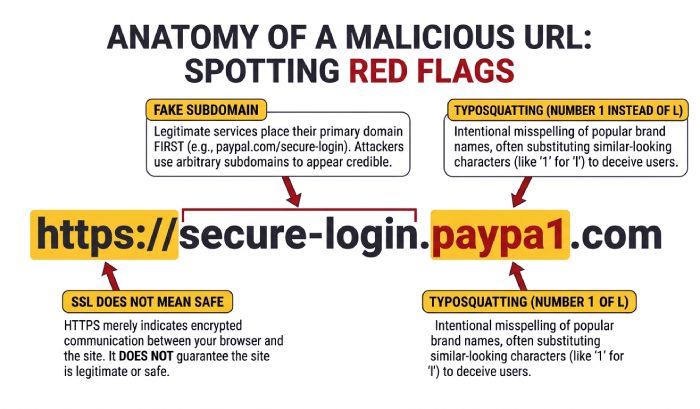
Common warning signs include misspelled brand names, extra hyphens, misleading subdomains, shortened links, unusual top-level domains, and fake login paths. For example, an attacker may register typosquat variants of a bank, SaaS provider, or shipping company to support brand impersonation. This is where typosquatting protection, a typosquat monitor, and continuous domain monitoring become critical.
Other red flags include:
- URLs that replace letters with numbers, such as “paypa1” instead of “paypal”
- Domains registered very recently through a domain registrar
- Links that redirect multiple times before landing on a phishing page
- Pages that mimic Microsoft Outlook, Gmail, or corporate SSO portals
- Forms asking for passwords, MFA codes, card numbers, or recovery phrases
A scam website checker can detect many of these suspicious patterns through automated URL analysis, reputation checks, and redirection detection.
Technical Warning Signs
Not every unsafe page looks suspicious. Some fraudulent websites use HTTPS and even a valid SSL Certificate. That is why HTTPS verification and an SSL certificate check are useful but not sufficient. A scanner should also perform certificate analysis, inspect Secure Socket Layer / Secure Socket Layer configuration, review DNS records, and compare hosting infrastructure against known attacker behavior.
A good phishing link scanner may evaluate DNS, MX Server configuration, DNS monitoring signals, and MX server monitoring data. Combined with threat intelligence, these checks help expose malicious links that appear legitimate at first glance.
How Phishing Link Scanners Detect Suspicious Links
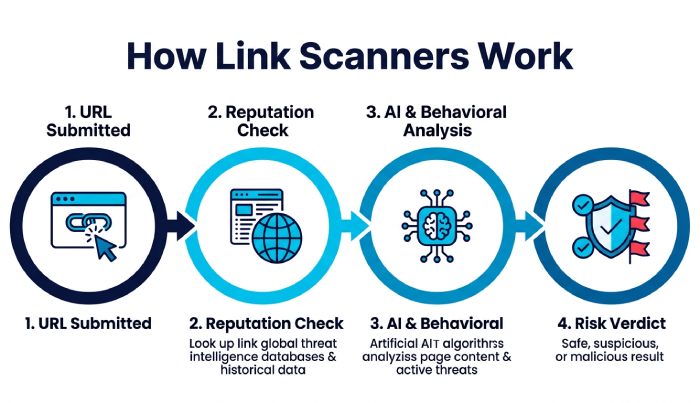
Modern tools go far beyond static blacklists. A capable phishing link scanner uses layered detection methods, including real-time scanning, reputation databases, behavioral analysis, sandboxing, and AI-powered scanning.
Reputation, Threat Intelligence, and URL Analysis
The first layer is reputation. A phishing link checker compares a URL, domain, IP address, and hosting provider against known threat intelligence feeds. These feeds may come from security researchers, commercial vendors, abuse reports, malware sandboxes, and customer telemetry.
A scam website checker also performs deep analysis on domain age, registrar data, SSL details, redirects, page content, and detected forms. A domain lookup tool can reveal whether the site was registered recently, whether DNS has changed frequently, or whether the domain resembles a protected brand.
This is especially valuable for zero-day detection, where a phishing site has not yet appeared on public blocklists. With real-time scanning, a scanner can detect active risk even if the URL was created minutes ago.
Machine Learning and Behavioral Detection
Advanced platforms use a machine learning algorithm to classify suspicious URLs based on visual similarity, HTML structure, scripts, form behavior, hosting patterns, and known phishing kits. This helps detect phishing scams that imitate Fortune 500 brands, cloud services, banks, cryptocurrency platforms, or email providers.
For example, Bolster and Bolster.ai focus heavily on automated takedown, brand abuse detection, and brand monitoring, while CheckPhish can help analyze live phishing infrastructure. SafeToOpen Paste Guard and SafeToOpen Email Security add protection around pasted links, inboxes, and user workflows.
Why Real-Time Scanning Matters
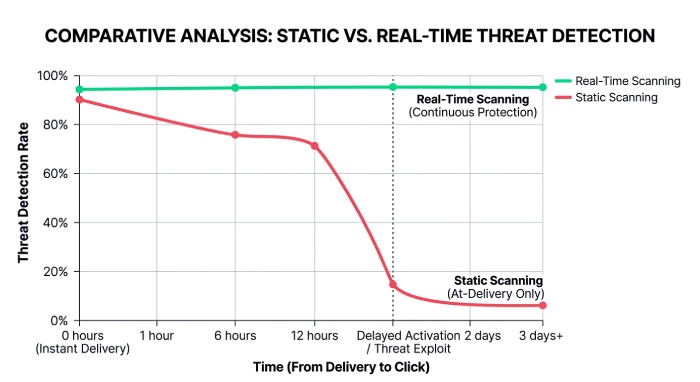
Attackers often rotate domains quickly. A link may be harmless when an email is delivered but become dangerous later. Real-time scanning solves this by checking the destination at click time, not just delivery time. This provides a more accurate secure link verdict and improves email link protection, especially against delayed-activation attacks and spam filter avoidance.
Best Practices to Block and Avoid Phishing Links
Technology helps, but prevention also requires disciplined user behavior and layered controls. The safest approach combines browser security, authentication controls, email security, domain monitoring, and continuous threat monitoring.
Protect Email, Browsers, and Communications
Organizations should deploy email security tools that support attachment scanning, sender analysis, URL rewriting, and real-time scanning. Microsoft Outlook and Gmail environments benefit from dedicated Outlook integration and Gmail integration, especially when scanners evaluate links at the point of click.
Users should also enable safe browsing protections in Chrome, Edge, Safari, and Firefox. A trusted browser extension can add on-page warnings, block malicious links, and provide fast link safety checks before a user submits data. For sensitive workflows, prioritize tools that support privacy-first scanning and encrypted data transmission to maintain secure communications.
Block Lookalike Domains and Brand Abuse
For companies, typosquatting protection is non-negotiable. Attackers frequently register lookalike domains to host fraudulent websites, fake support portals, invoice scams, or employee login pages. Continuous domain monitoring helps identify these domains early.
Businesses should monitor for:
- Newly registered lookalike domains
- DNS changes pointing to suspicious hosting
- MX records suggesting email-enabled impersonation
- Fake SSL certificates issued for brand-like domains
- Active phishing kits or cloned login pages
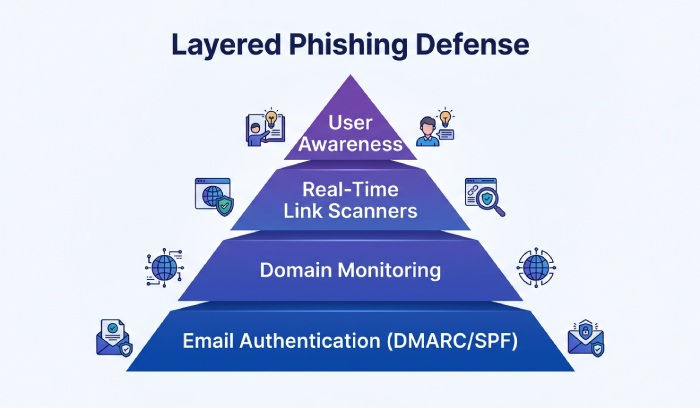
Combining domain monitoring, typosquatting protection, threat intelligence, and takedown workflows reduces exposure before customers or employees are targeted.
Use Authentication and Policy Controls
SPF, DKIM, and DMARC help reduce spoofing and improve inbound trust decisions. EasyDMARC is one platform organizations use to manage DMARC enforcement and improve email domain protection. While these protocols do not stop every phishing attack, they strengthen email security and reduce the chance that attackers can impersonate your domain directly.
Choosing the Right Phishing Link Scanner for Personal or Business Use
The best phishing link scanner depends on whether you need quick personal checks, enterprise protection, API access, or brand defense. A casual user may only need a free URL scanner or scam website checker. A company handling customer data needs real-time scanning, integrations, reporting, and automated response.
Key Features to Compare
When evaluating a phishing link checker, look for:
- Real-time scanning at click time
- Strong threat intelligence and live reputation feeds
- URL analysis with redirects, DNS, certificate, and page inspection
- Domain monitoring and typosquatting protection
- Scan result alerts for security teams
- API support, such as CheckPhish API
- Integrations with Microsoft Outlook, Gmail, SIEM, and SOAR tools
- Support for Chrome, Edge, Safari, and Firefox
- Clear reporting and a reliable secure link verdict
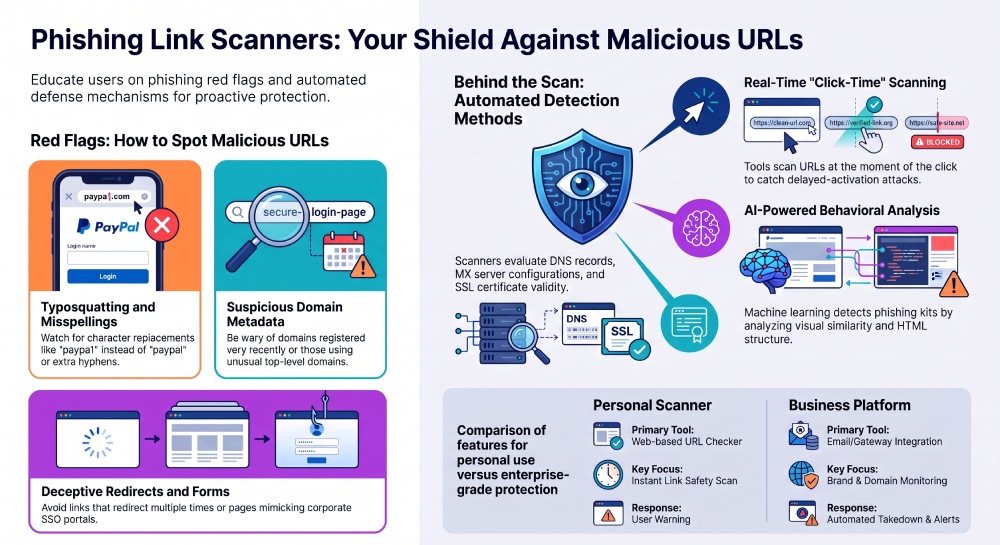
For personal users, CheckPhish Community or a browser-based scam website checker may be enough. For enterprises, platforms such as Bolster, SafeToOpen, EasyDMARC, and CheckPhish Scanner can support larger-scale email security, brand monitoring, and incident response workflows. Some organizations may also contact the Bolster Sales Team to evaluate enterprise-grade brand abuse and takedown capabilities.
Matching the Tool to the Risk
If your primary concern is inbox protection, choose a scanner with strong email link protection, sender analysis, attachment scanning, and integrations for Microsoft Outlook and Gmail. If your risk is customer-facing brand impersonation, prioritize domain monitoring, typosquatting protection, takedown support, and a mature threat intelligence platform.
For security teams, the ideal phishing link scanner should support both quick triage and deep analysis. It should detect malicious links, flag suspicious URLs, identify malicious websites, monitor DNS and MX Server changes, and produce actionable alerts. In short, the right phishing link checker does more than answer “is this link safe?”—it helps prevent phishing, reduce fraud, and strengthen security across users, domains, browsers, and email.
General Manager
General Manager of DuoCircle. Product strategy and commercial lead across DuoCircle's 2,000+ customer base.
LinkedIn Profile →Protect your inbox from phishing attacks
Real-time email security with 60-day free trial. No credit card required.