Phishing Link Detection: How To Identify Malicious Links Before They Cause Harm

Quick Answer
Phishing link detection helps identify malicious URLs before they steal credentials, spread malware, or cause financial loss. Check the sender, inspect the URL, avoid suspicious links, and verify websites before entering sensitive information.
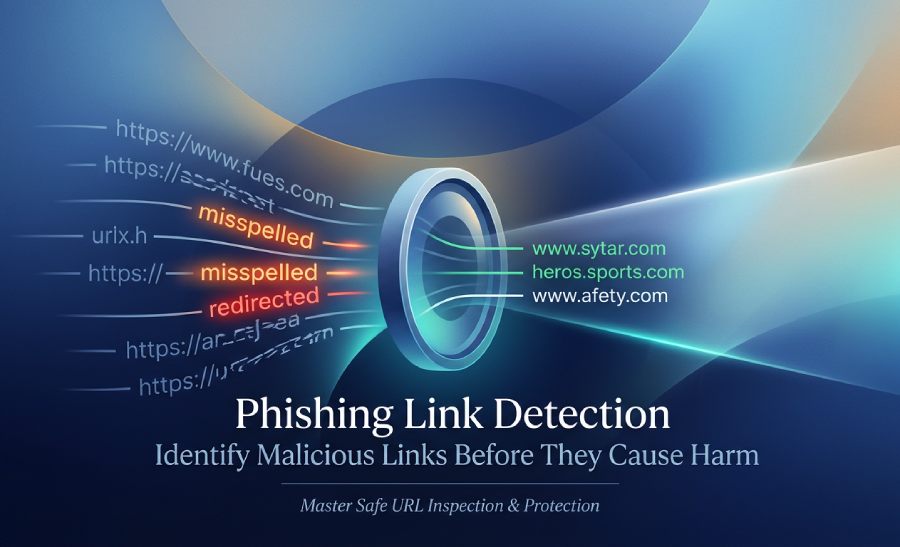
Phishing links often appear surprisingly authentic, yet a single click could compromise your personal information, financial details, or credentials. It’s crucial to develop skills for identifying dubious URLs prior to engaging with them to ensure your safety. This guide outlines how to recognize potential threats in links, safe methods for examining URLs, as well as tools and strategies to identify phishing risks in real time.
What Phishing Links Are and Why They’re Dangerous
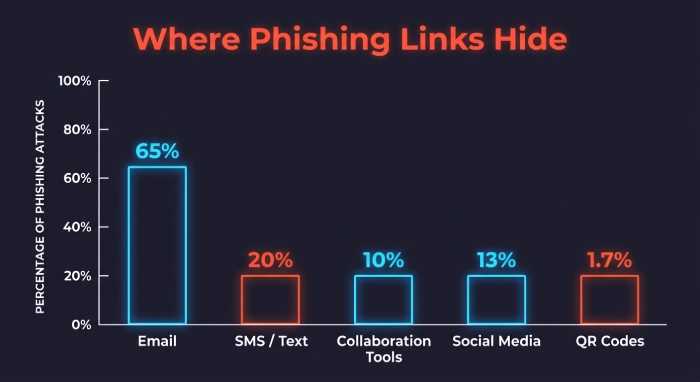
Phishing links are deceptive URLs designed to trick users into visiting fraudulent websites, entering credentials, downloading malware, or approving unauthorized transactions. These malicious links often appear in emails, text messages, collaboration tools, social media posts, QR codes, and even search results. Attackers use phishing scams to imitate trusted brands, financial institutions, cloud platforms, delivery companies, and internal corporate systems.
Effective phishing link detection is critical because modern phishing attempts are increasingly convincing. A phishing URL may lead to a fake Microsoft Outlook login page, a counterfeit banking portal, or a cloned SaaS dashboard. Some phishing scams use a redirected URL to hide the final destination, while others rely on URL shorteners, compromised websites, or newly registered domains that have not yet appeared in a phishing URL database.
Phishing attempts are dangerous because they can lead to account takeover, ransomware deployment, wire fraud, and identity theft. For businesses, malicious links can compromise web and email domains, expose customer data, and damage trust. For individuals, the consequences may include stolen passwords, financial loss, and long-term identity theft prevention challenges.
Why attackers rely on suspicious URLs
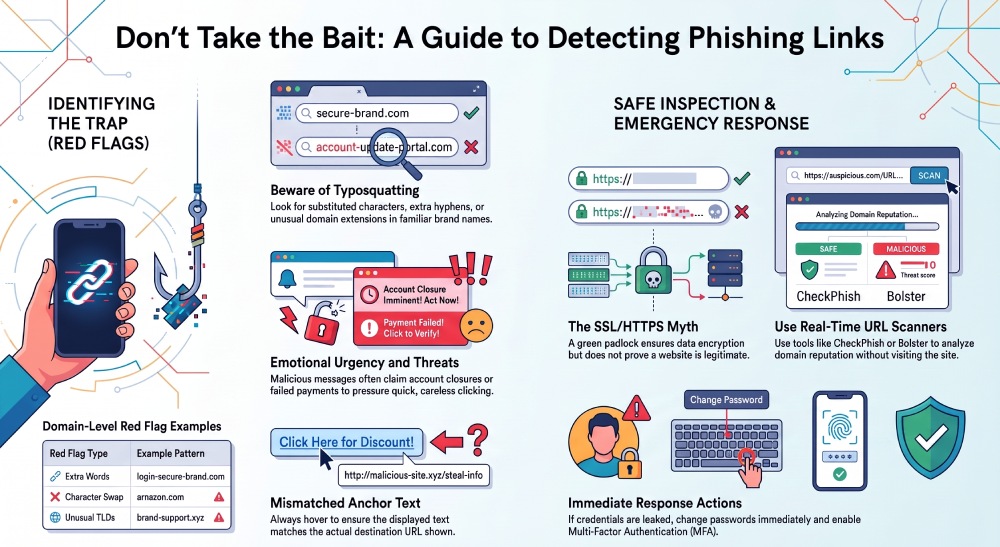
Attackers prefer suspicious URLs because they are easy to distribute and difficult for users to evaluate quickly. A message may look legitimate at first glance, especially when it uses brand impersonation, a convincing logo, or urgent language. Some fraudulent websites also use HTTPS and a valid SSL certificate, which can mislead users into thinking the page is safe. While an HTTPS site protects data in transit, it does not prove the website is legitimate.
This is why phishing link detection must go beyond checking for SSL or HTTPS. A strong phishing scanner evaluates domain reputation, redirects, page content, hosting behavior, suspicious patterns, and threat intelligence signals. A real-time URL scanner can also identify new threats, including zero-day phishing campaigns that traditional blocklists may not yet recognize.
Common Signs of a Malicious Link
Recognizing malicious links begins with understanding the warning signs. Although not every suspicious URL is harmful, repeated indicators should trigger caution and further inspection with a phishing link checker or link safety checker.
Misspelled domains and typosquatting
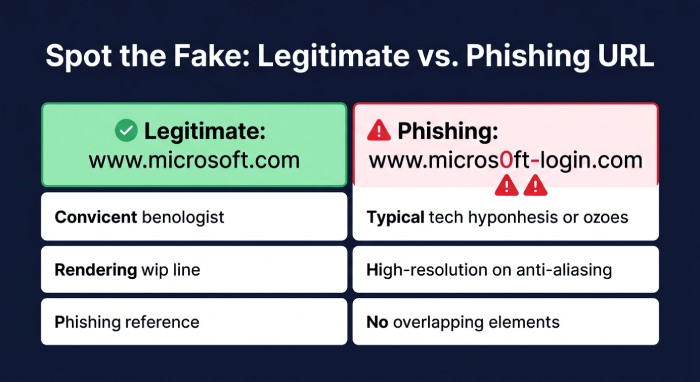
Typosquatting attacks use domains that look nearly identical to trusted brands. For example, attackers may replace letters, add hyphens, use lookalike characters, or register deceptive TLD variations. These typosquat variants are commonly used in phishing scams because users often scan links and miss small differences.
Organizations use domain monitoring, typosquat monitoring, and brand protection platforms such as Bolster or bolster.ai to identify lookalike domains before they are weaponized. Fortune 500 companies often rely on continuous monitoring, threat analysis, and take-down services to reduce exposure. Bolster’s take down services, for example, help organizations respond to fraudulent websites involved in brand impersonation and phishing attempts.
Red flags in the domain name
Watch for:
- Extra words added to a brand name, such as login-secure-brand.com
- Misspellings, character substitutions, or unusual TLDs
- Domains that imitate web and email domains used by legitimate companies
- Newly created domains with no reputation history
- Links where the displayed anchor text does not match the actual destination
A phishing link checker can help identify these suspicious patterns and provide link scan results before you interact with the page.
Urgency, threats, and unexpected requests
Many phishing attempts rely on emotional pressure. Messages may claim that your account will be closed, a payment failed, a package is delayed, or your password must be reset immediately. These tactics are common in phishing scams because urgency reduces careful decision-making.
If a message asks you to verify credentials, download an attachment, approve a transaction, or bypass normal security processes, treat the link as suspicious. Before clicking, scan suspicious URLs with a phishing scanner, scam website checker, or real-time URL scanner.
Safe Ways to Inspect Links Before Clicking
Safe inspection is a core part of phishing link detection. The goal is to determine whether a link is trustworthy without opening yourself to risk.
Hover, preview, and expand carefully
On desktop, hover over a link to preview the destination. On mobile, press and hold carefully to reveal the URL without opening it. Look for mismatched domains, URL shorteners, encoded characters, and strange paths. If the link is shortened, use a reputable link tester tool or phishing link checker to inspect it safely.
Do not manually visit suspicious URLs in your browser. Instead, use site URL scanning, live URL scanning, or a real-time URL scanner that performs URL extraction and inspection in a controlled environment. Tools that provide sandbox analysis can open the destination in isolation and analyze page behavior without exposing your device.
Check the destination, not just the display text
A message may show “View Invoice” or “Microsoft Outlook Security Notice,” but the actual link may lead to a fraudulent website. Always inspect the destination domain. Also check whether the site forces unexpected redirects, since a redirected URL can conceal malicious infrastructure.
A good phishing detection tool should report the final destination, link status, redirect chain, hosting details, SSL certificate information, and any malicious site warning associated with the page.
Verify through official channels
If a link claims to come from a bank, employer, delivery provider, or software vendor, do not use the link in the message. Open a new browser tab and navigate to the official website directly. For workplace messages, confirm through secure communications such as an internal ticketing system or verified contact.
Organizations should strengthen email security with SPF, DKIM, and DMARC. Running an SPF check, DKIM check, and DMARC check helps verify whether messages are authorized to use a domain. While these controls do not eliminate every phishing risk, they improve email link protection and reduce spoofing across web and email domains.
Tools and Technologies for Phishing Link Detection
Modern phishing link detection combines reputation data, AI-powered detection, sandbox analysis, browser security, and email security controls. Because phishing attempts evolve rapidly, security teams need more than static blocklists.
Phishing link checkers and scanners
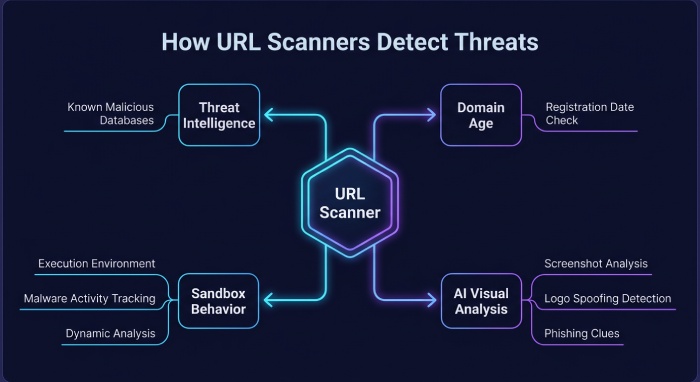
A phishing link checker helps users and analysts scan suspicious URLs before clicking. Popular tools include CheckPhish, EasyDMARC, SafeToOpen, and Bolster. These platforms analyze suspicious URLs using threat intelligence, URL reputation, domain age, redirects, page content, and known indicators from a phishing URL database.
Examples include:
- CheckPhish: Offers a Phishing Link Checker Tool, CheckPhish Community insights, and the CheckPhish API for automated workflows.
- EasyDMARC: Provides the EasyDMARC Phishing Link Scanner and EasyDMARC scam link checker, along with email authentication tools for SPF, DKIM, and DMARC.
- SafeToOpen: Offers the SafeToOpen Scanner, SafeToOpen browser extension, SafeToOpen email tool, and SafeToOpen sandbox for safer link inspection.
- Bolster: Supports brand protection, domain monitoring, phishing protection, and take-down services for organizations targeted by phishing scams.
A phishing scanner can detect malicious websites by reviewing the URL, page content, hosting infrastructure, and visual similarity to known brands. A real-time URL scanner is especially useful for identifying suspicious URLs that are newly created, unrated links, or part of zero-day phishing campaigns.
What good link scan results should include
Useful link scan results should show:
- Whether the URL is clean, suspicious, or malicious
- The final redirected URL and link status
- Domain registration and TLD information
- SSL and HTTPS details, including SSL certificate validity
- Page screenshots or sandbox analysis findings
- Threat intelligence matches and suspicious patterns
- Whether the domain appears in a phishing URL database
- Immediate alerts when malicious links are confirmed
A reliable phishing link checker should also support continuous monitoring, especially for enterprises that face ongoing brand impersonation and typosquatting attacks.
Real-time URL scanning and AI-powered detection
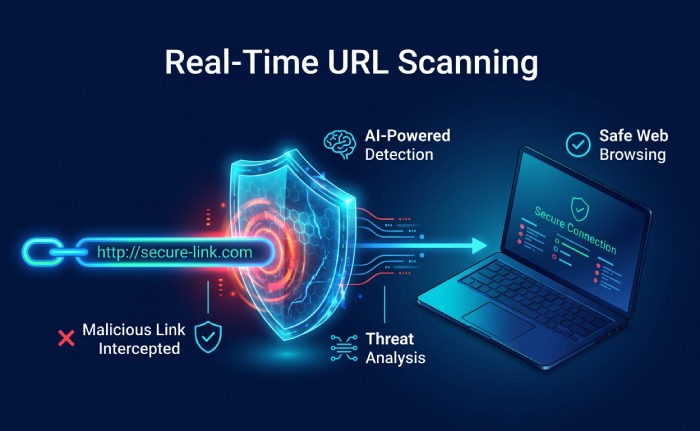
A real-time URL scanner evaluates links at the moment of access, rather than relying only on old reputation data. This matters because attackers often create fraudulent websites for short-lived campaigns. By the time a static blacklist catches up, users may already have clicked.
AI-powered detection uses a machine-learning algorithm to identify visual clones, suspicious login forms, abnormal redirects, and page behavior associated with phishing attempts. Combined with threat analysis, live URL scanning, and sandbox analysis, these systems can detect malicious websites even when they are hosted on compromised infrastructure or previously clean domains.
Real-time protection is also important for email link protection. Some email security tools rewrite or inspect links when users click them, while browser security tools can block malicious links before pages load. In enterprise environments, integrations with Microsoft Outlook and secure email gateways help scan suspicious URLs embedded in messages and attachments.
What to Do If You Click a Suspicious Link
Clicking a suspicious link does not always mean your account is compromised, but you should act quickly. The response depends on whether you only opened the page, entered credentials, downloaded a file, or approved a request.
Immediate steps after clicking
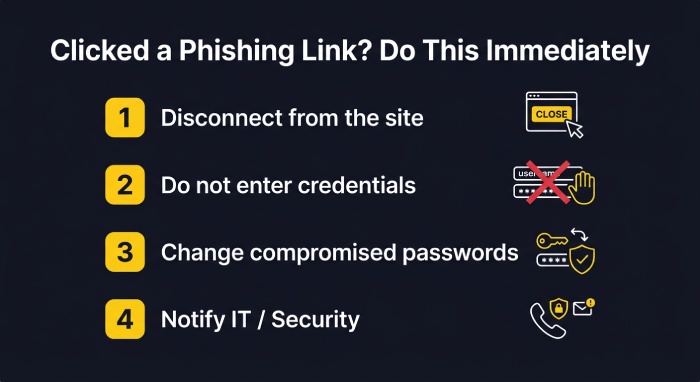
If you clicked one of these malicious links, disconnect from the site immediately. Do not enter any information. If you submitted a password, change it from a trusted device and enable multifactor authentication. If you downloaded a file, do not open it; run endpoint protection and notify your security team.
For workplace incidents, report the message to IT or security operations. Provide the full email, headers if available, and the suspicious URL. Security teams can use a phishing scanner, phishing link checker, or real-time URL scanner to analyze the page and determine whether other users received the same phishing attempts.
If credentials were entered
If you entered credentials on a phishing URL:
- Change the affected password immediately.
- Revoke active sessions and tokens if available.
- Enable or reset multifactor authentication.
- Review account activity for suspicious logins.
- Notify your organization, bank, or service provider.
- Monitor for identity theft prevention indicators such as unauthorized account changes.
Security teams should also search email logs for related phishing scams, block the domain, check MX Servers where relevant, and use threat intelligence to identify connected infrastructure.
Strengthen protection after the incident
After an incident, improve phishing protection with layered controls. Use email security tools, browser security tools, and email link protection to block future malicious links. Deploy a phishing detection tool that can scan suspicious URLs in real time and generate immediate alerts when users encounter dangerous pages.
Organizations should also invest in domain monitoring, typosquat monitoring, DMARC enforcement, employee training, and brand protection. Continuous monitoring helps identify fraudulent websites early, while take-down services reduce the lifespan of active phishing scams.
For individuals, use a trusted phishing link checker before opening suspicious URLs, keep browsers updated, and treat unexpected messages with caution. For businesses, combine a phishing scanner, real-time URL scanner, SPF, DKIM, DMARC, sandbox analysis, and threat intelligence to reduce exposure across email, web, and collaboration channels.
General Manager
General Manager of DuoCircle. Product strategy and commercial lead across DuoCircle's 2,000+ customer base.
LinkedIn Profile →Protect your inbox from phishing attacks
Real-time email security with 60-day free trial. No credit card required.