How AI Detects Zero-Day Phishing Before Security Patches Are Released

Quick Answer
AI detects zero-day phishing by analyzing behavior, anomalies, email patterns, and threat intelligence instead of relying on known signatures. This enables organizations to identify and block new phishing attacks before security patches or traditional defenses are available.
Zero-day phishing is a phishing attack that exploits an unknown vulnerability, a newly registered lookalike domain, a fresh social engineering technique, or unpatched software before a software vendor, security team, or security software provider has released a fix. Unlike familiar spam or commodity malware, zero-day phishing is designed to appear novel: the malicious link may not be on a blacklist, the malicious attachment may not match any known malware signature, and the phishing email may use AI-crafted content that looks convincingly human.
A zero-day phishing cyber attack often begins before defenders know what to search for. Attackers may exploit an unknown vulnerability in a document viewer, browser, authentication flow, or cloud application. They may also exploit unpatched software in collaboration platforms, email clients, or file-sharing tools. Because there is no established indicator of compromise, a legacy security system can miss the initial breach.
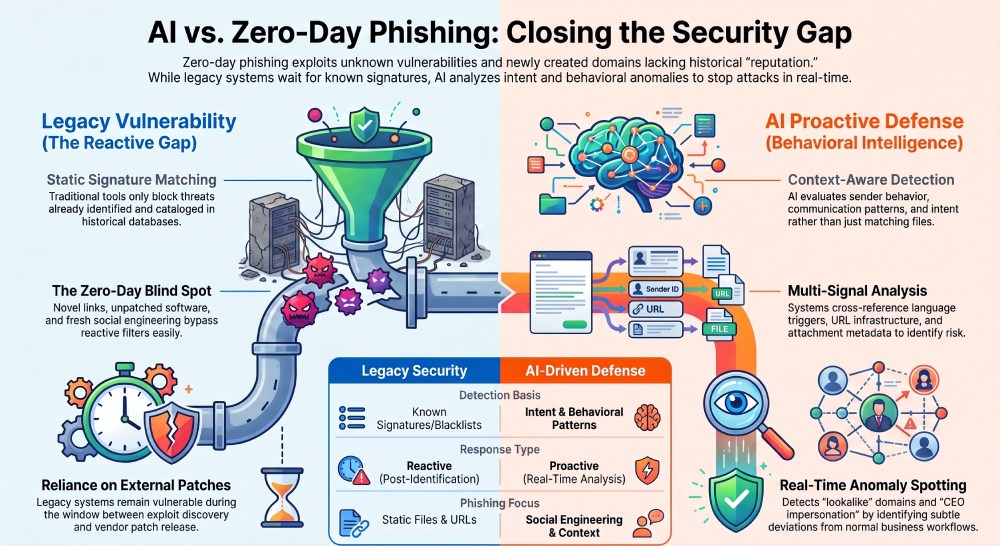
Traditional defenses struggle because many are reactive. A signature-based filter, rule-based filter, antivirus engine, spam filter, or basic URL filter depends on known patterns. If the phishing campaign uses a new malicious link, a clean domain reputation, or a malicious attachment that has never been submitted to a malware scanner, those tools may allow the phishing email through.
Why Legacy Security Tools Fall Behind
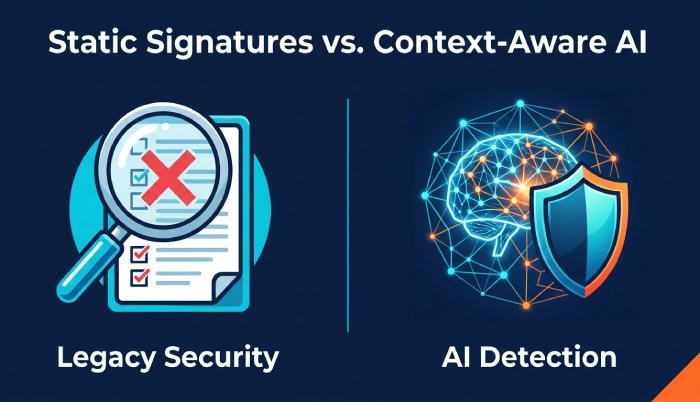
Legacy security tools were built for known threats. They compare files, URLs, sender addresses, and message content against historical data. That approach works when the cyber attack has already been observed, but zero-day phishing is different. It relies on novelty, speed, and deception.
For example, a spear phishing email targeting a CFO or CEO may impersonate a vendor, reference LinkedIn activity, copy language from a corporate website, and include a PDF with a malicious attachment. If the attachment is weaponized through an unknown vulnerability, antivirus may not flag it immediately. If the malicious link points to a newly created phishing site that imitates Google or Microsoft authentication, a blacklist may not yet contain the domain.
The Human Layer of the Attack
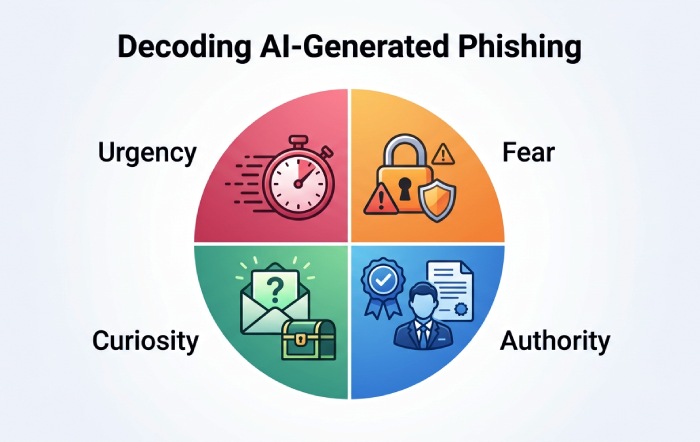
Zero-day phishing is not only technical; it is rooted in social engineering. Attackers use urgency, authority, fear, curiosity, and trust as psychological triggers. A targeted email may claim that a payment approval, password reset, invoice, or legal notice requires immediate action. The goal is often credential theft, malware delivery, ransomware deployment, or business email compromise.
Business email compromise, or BEC, is especially dangerous because it may not include malware at all. A BEC phishing attack can persuade an employee to change bank details, approve a wire transfer, or disclose sensitive data. That means phishing protection must analyze intent, context, and behavior—not just files and links.
How AI Identifies Suspicious Patterns Without Known Signatures
AI detects zero-day phishing by looking beyond static signatures. Instead of asking, “Have we seen this malicious link before?” an AI model asks, “Does this message behave like a phishing attack?” This allows real-time detection even when the threat is new, the vulnerability is unknown, and security patches do not yet exist.
Modern AI systems use machine learning, natural language processing, graph analysis, anomaly detection, and real-time analytics to identify suspicious combinations of signals. A phishing email may not be dangerous in one dimension, but when the language, sender behavior, URL structure, attachment metadata, and authentication anomalies are viewed together, the risk becomes clear.
Context-Aware Detection Instead of Static Matching
Context-aware detection is critical for zero-day phishing. AI can compare the message against normal communication patterns across an organization. For example, does this “vendor” usually contact finance? Has this sender ever emailed the company before? Is the message asking for a new payment workflow? Does the domain differ by one character from a known partner?
This is where AI offers proactive defense. It can identify a phishing attack before the software vendor confirms an exploit, before a Secure Email Gateway receives a new rule, and before an endpoint security tool sees the payload execute.
LLMs and AI-Generated Phishing
Attackers increasingly use a large language model, or LLM, to create AI-generated phishing messages with polished grammar, local context, and persuasive tone. AI-crafted content can bypass old grammar-based red flags. In response, LLM phishing protection must analyze deeper traits: intent, request abnormality, authority cues, emotional manipulation, and inconsistencies across the sender’s identity.
Researchers and companies such as Bolster and StrongestLayer have highlighted how phishing attacks are becoming more adaptive. Security practitioners, including voices like Jeevan Pant, have discussed how AI changes both attack generation and defense. In scenarios like Project Delta-style testing, defenders evaluate whether AI can detect polymorphic phishing campaigns that constantly rewrite their messages while preserving the same malicious objective.
Key Signals AI Uses: Language, Behavior, URLs, Attachments, and Sender Reputation
AI detection works best when it combines multiple signals. A single indicator may be weak, but together they can expose zero-day phishing before a patch is available.
Language and Social Engineering Signals
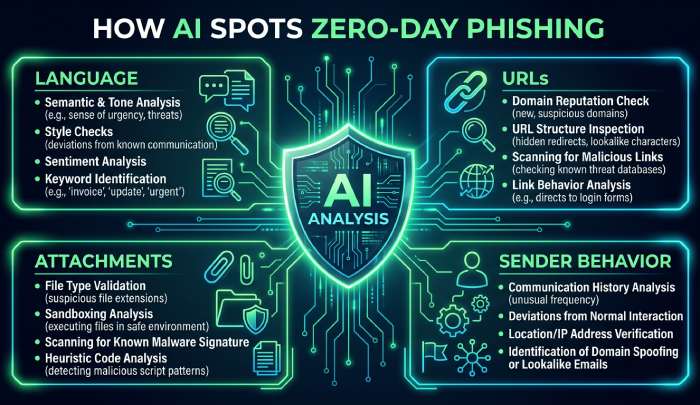
AI examines whether a phishing email contains social engineering patterns such as urgency, secrecy, payment pressure, credential requests, or unusual authority claims. It can detect when a supposed CEO asks an employee to bypass normal approval, when a CFO receives an invoice with altered banking instructions, or when a vendor message pressures the recipient to open a malicious attachment.
Intent and Psychological Triggers
The strongest clue may be intent. A message that asks the user to authenticate through an unfamiliar page, download a PDF, disable two-factor authentication, or click a malicious link can be suspicious even if the URL is new. AI models identify these psychological triggers and compare them with normal business workflows.
URL, Domain, and Link Verification Signals
AI performs link verification by analyzing domain age, redirects, hosting infrastructure, SSL patterns, page similarity, and brand impersonation. A malicious link may use a lookalike domain that resembles Google, a payroll portal, or a vendor login page. Even if the phishing site has not been reported, AI can detect suspicious form fields, cloned branding, abnormal scripts, and credential harvesting behavior.
Brand and Infrastructure Similarity
AI can compare a phishing site with a legitimate corporate website or cloud login page. It may identify subtle misspellings, mismatched certificates, suspicious hosting, or rapid domain creation. This helps catch zero-day phishing where the malicious link has no reputation history.
Attachment and Malware Signals
A malicious attachment may be a PDF, Office document, archive, or HTML file. AI evaluates file structure, embedded scripts, macros, obfuscation, external calls, and payload behavior in a sandbox. If a malicious attachment attempts to exploit unpatched software, evade anti-malware, or trigger malware-based phishing, AI can flag the risk before a malware scanner has a known signature.
Endpoint and Post-Click Behavior
If a user interacts with the phishing email, endpoint security, EDR, antivirus, and the email gateway can share telemetry. AI may detect unusual process execution, browser redirection, authentication prompts, or attempted malware installation. This cross-layer visibility is essential when an unknown vulnerability turns a simple phishing attack into a full cyber attack.
Sender Reputation and Behavioral Anomalies
AI evaluates sender reputation beyond basic allowlists. It looks at historical relationships, sending infrastructure, DMARC/SPF/DKIM alignment, reply-chain anomalies, time of day, geolocation, and communication frequency. A phishing email from a compromised account may pass authentication checks, but AI can still notice abnormal behavior, such as a vendor suddenly sending a payment-change request from an unfamiliar IP.
Real-Time Detection Workflows Before Vendor Patches Exist
In a zero-day phishing scenario, defenders cannot wait for a software vendor patch. The security system must make a risk decision in seconds. Real-time detection workflows typically begin at the email gateway, continue through URL and attachment analysis, and extend to endpoint security if the user clicks.
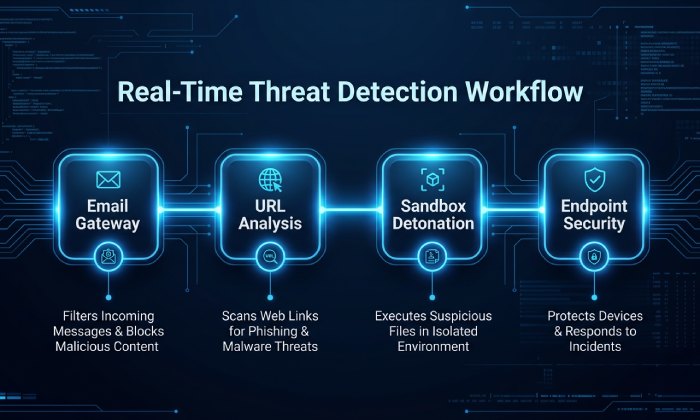
A Secure Email Gateway may quarantine a suspicious phishing email, rewrite a malicious link for time-of-click inspection, or detonate a malicious attachment in a sandbox. If the message is allowed but later becomes suspicious, AI can retroactively pull it from inboxes. This is especially important for polymorphic phishing, where each phishing email is slightly different and avoids a single signature.
From Email Gateway to Endpoint Response
A modern workflow connects email gateway data, EDR alerts, endpoint security telemetry, cloud authentication logs, and real-time analytics. If a user clicks a malicious link and enters credentials, the system may trigger a password reset, session revocation, two-factor authentication enforcement, or conditional access controls.
For example, if a BEC message impersonates a CEO and asks finance to update vendor banking information, AI may flag it based on language, sender behavior, and business context. If a malware-based phishing message uses a malicious attachment to exploit unpatched software, the sandbox and endpoint security tools may detect suspicious execution even before the unknown vulnerability receives a CVE or patch.
Continuous Learning During an Active Campaign
AI systems improve as the phishing campaign unfolds. They cluster similar messages, identify shared infrastructure, detect new lookalike domains, and update phishing protection policies. This allows defenders to respond to a cyber attack while the exploit is still emerging. Platforms such as StrongestLayer, Bolster, and other AI-driven security providers use these adaptive techniques to reduce exposure during the window between discovery and patch release.
Limits of AI Detection and Best Practices for Reducing Zero-Day Phishing Risk
AI is powerful, but it is not perfect. A sophisticated phishing attack may use compromised accounts, clean infrastructure, encrypted payloads, or highly personalized social engineering. A zero-day phishing message may contain no obvious malicious link until after the user replies. A malicious attachment may remain dormant in a sandbox. An unknown vulnerability in unpatched software may behave differently across environments.
Organizations should treat AI as part of a layered defense, not a standalone answer. The goal is to reduce the chance that a phishing email becomes an initial breach, data breach, ransomware event, or credential theft incident.
Best Practices for Stronger Protection
Use AI-based phishing protection alongside a Secure Email Gateway, URL filter, anti-malware, EDR, endpoint security, antivirus, and cloud authentication monitoring. Enforce two-factor authentication everywhere, especially for email, VPN, finance systems, and administrator accounts. Keep software patched quickly, because unpatched software increases the impact of every unknown vulnerability.
Security training remains essential. Employees should learn how social engineering works, how to inspect a malicious link, how to report a phishing email, and how to verify unusual requests through a trusted channel. This is especially important for executives, finance teams, HR, and IT administrators targeted by spear phishing and business email compromise.
Organizations should also monitor social media exposure, LinkedIn details, vendor relationships, and public corporate website content that attackers can use for brand impersonation or AI-crafted content. The strongest layer of defense combines AI, human awareness, strong authentication, rapid patching, and well-integrated security workflows that can respond before a vendor patch exists.
General Manager
General Manager of DuoCircle. Product strategy and commercial lead across DuoCircle's 2,000+ customer base.
LinkedIn Profile →Protect your inbox from phishing attacks
Real-time email security with 60-day free trial. No credit card required.