Browser-In-The-Browser Vs. Traditional Phishing Pages: What Makes BitB Attacks More Convincing?

Quick Answer
Browser-in-the-Browser (BitB) attacks are more convincing because they create fake login windows inside legitimate websites, making phishing pages appear authentic. Traditional phishing pages usually rely on suspicious redirects or cloned websites that are easier to detect.
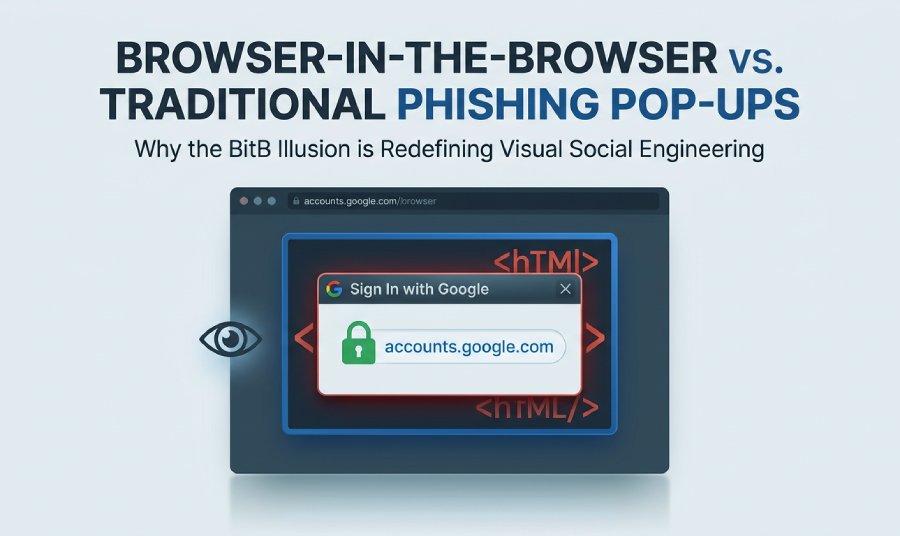
Phishing schemes have advanced significantly, moving past mere counterfeit websites and dubious links. Unlike classic phishing tactics that redirect users to deceitful domains, Browser-in-the-Browser (BitB) phishing generates a fraudulent login window that appears directly within an authentic webpage. By mimicking recognizable single sign-on (SSO) prompts, browser layouts, and reliable authentication processes, these attacks can make the theft of credentials seem extraordinarily credible. It’s crucial to grasp the distinctions between traditional phishing and BitB methods to understand the effectiveness of this newer approach and how both individuals and organizations can protect themselves against it.
How Traditional Phishing Pages Work—and Where They Fall Short
Traditional phishing usually relies on luring a victim to a fake website that imitates a trusted brand such as Microsoft, Google, Apple, Facebook, Meta, Steam, or Gmail. The attacker may send an email phishing message, a Microsoft Teams lure, a Telegram message, or a link posted on a compromised website. The user lands on a phishing site or fake portal, sees a fake authentication page, and is asked to enter user credentials, a one-time code, or other sensitive information.
The goal is typically credential theft, credential harvesting, data theft, account takeover, or gaining network access for secondary attacks. A threat actor may also use typosquatting, where a domain looks similar to a legitimate one, or URL deception, where links are disguised behind convincing anchor text.
However, traditional phishing pages often fall short because users have learned some basic warning signs:
- The domain in the browser address bar looks wrong.
- The page design feels slightly off.
- The login page opens in an unexpected tab.
- The site may lack expected browser security signals.
- A password manager may refuse to auto-fill credentials because the domain does not match.
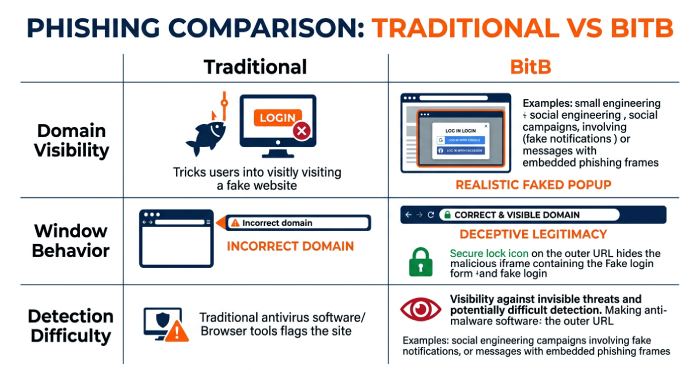
This is where traditional phishing becomes easier to detect. Even if the fake authentication page looks polished, the real address bar in Chrome or other web browsers can expose the malicious site. Anti-phishing tools, browser extensions, and modern browser security features also often flag known phishing domains. Services like PhishProtection can provide organizations with additional layers of defense to combat the ever-evolving threats posed by phishing attacks.
What Browser-in-the-Browser Phishing Is and How It Mimics Legitimate Login Pop-Ups
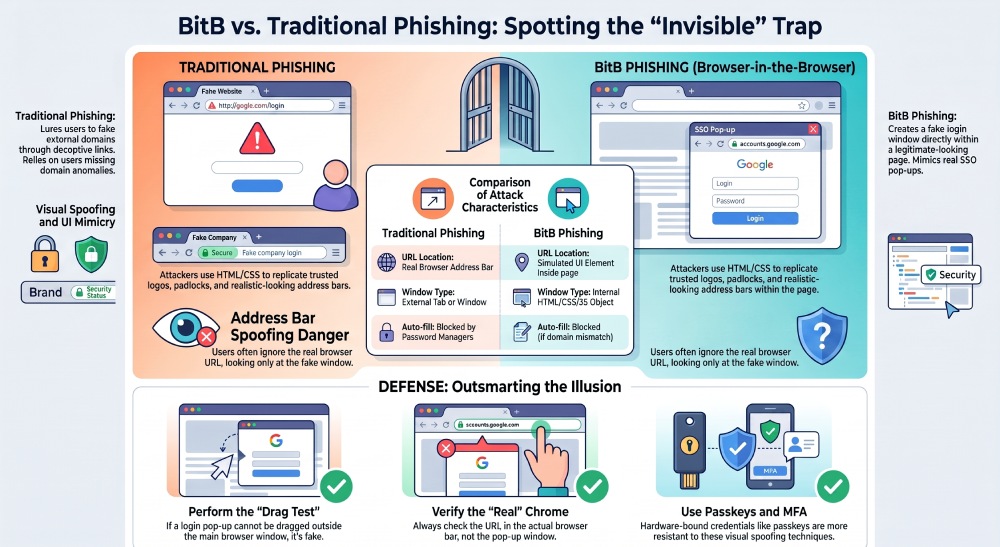
Browser-in-the-browser phishing, often shortened to BitB, is a more deceptive form of social engineering. A BitB attack does not simply send the victim to a standalone fake website. Instead, the malicious site displays a fake login window inside the browser that looks like a real login pop-up from a trusted identity provider.
For example, a victim may click “sign in with Google,” “sign in with Microsoft,” or “sign in with Apple” on what appears to be a normal service. Instead of opening a genuine single sign-on flow, the page shows a fake pop-up designed to mimic an authentic SSO login window. This fake login window may include a convincing title bar, brand logo, padlock icon, and even a realistic-looking URL field.
The technique was widely discussed after cybersecurity researcher mr.d0x demonstrated how attackers could use HTML, CSS, and JavaScript to create a browser-in-the-browser illusion. In a BitB attack, the fake login window is not a real browser window at all. It is part of the web page, built with web design tools and front-end code to simulate the appearance of a legitimate authentication prompt.
The Role of HTML, CSS, and JavaScript in the Illusion
The fake login window is commonly assembled using normal web design tools: HTML to structure the window, CSS to style the fake frame and address bar, and JavaScript to control movement, resizing, and form behavior. Because web design tools can reproduce familiar interface patterns with high precision, the fake authentication page can look unusually convincing.
This is the defining feature of browser-in-the-browser phishing: the victim believes they are interacting with a trusted login pop-up, but they are actually typing into a fake authentication page controlled by cybercriminals.
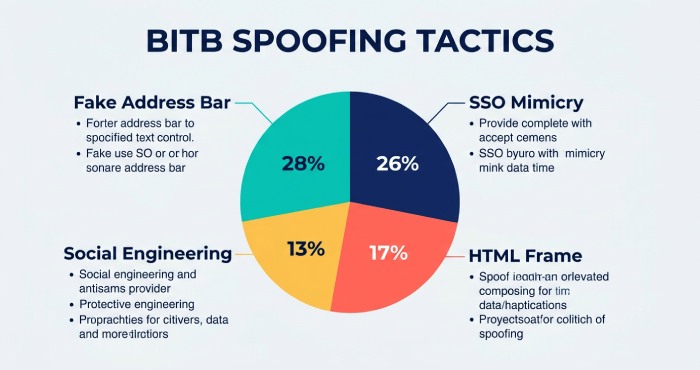
Why BitB Attacks Feel More Trustworthy: Visual Cues, URLs, and Familiar SSO Flows
BitB attacks are more convincing because they exploit how people have been trained to trust familiar login patterns. Many users regularly authenticate through single sign-on, or SSO, using Google, Microsoft, Facebook, Apple, or Meta accounts. When a site presents a “sign in with” button, users expect a login pop-up. That expectation makes the BitB attack feel normal.
Familiar Login Pop-Ups Reduce Suspicion
A traditional phishing page asks the victim to trust an unfamiliar domain. A browser-in-the-browser attack instead shows what appears to be a familiar login pop-up. The fake login window may look like a Microsoft account prompt, a Google OAuth screen, or a Facebook authentication dialog.
This visual spoofing makes the fake pop-up more persuasive than a standard fake website. The user is not just seeing a fake authentication page; they are seeing a simulated browser window that appears to belong to a trusted provider.
Address Bar Spoofing Makes the Trap More Believable
One of the most dangerous elements of a BitB attack is address bar spoofing. In normal phishing, the real browser address bar may reveal the malicious site. In browser-in-the-browser phishing, the attacker creates a fake address bar inside the fake login window. That fake address bar can display a legitimate-looking URL such as accounts.google.com, login.microsoftonline.com, or another trusted domain.
This address bar spoofing is not changing the real browser URL. Instead, it is visual deception. But for many victims, the difference is not obvious. They see the expected URL inside the login pop-up and assume it is safe.
Why the Fake Address Bar Works
The fake address bar works because users often check only the visible URL inside the apparent login pop-up, not the actual browser chrome at the top of the screen. A well-designed BitB attack uses web design tools to reproduce icons, padlocks, spacing, shadows, and window controls. Combined with social engineering, address bar spoofing can make the fake authentication page appear legitimate.
Real-World Examples Show the Risk
Reports from BleepingComputer, Infosecurity Magazine, Kaspersky, and NordLayer have highlighted how BitB-style attacks can be used against popular authentication flows. Google Threat Analysis Group has also documented threat activity involving sophisticated credential theft campaigns, including operations connected to Ghostwriter, Belarus, and Ukraine.
In one real-world example discussed in security reporting, attackers abused themes around passport.i.ua and Telegram to target users. A Telegram Channel or message can direct victims to a phishing site where a fake login window captures credentials. Similar tactics can be adapted for law firm portals, Microsoft Teams invitations, Gmail access prompts, Steam account logins, or business SSO workflows.
Key Differences Between BitB and Traditional Phishing in Detection and User Awareness
The main difference between a BitB attack and traditional phishing is where the deception happens. Traditional phishing usually depends on a fake website and a fake authentication page. Browser-in-the-browser phishing adds another layer: a fake login window that imitates a trusted browser-generated login pop-up.
Detection Is Harder for Users
Traditional phishing can often be spotted by checking the actual domain, noticing typosquatting, or seeing that a password manager will not auto-fill credentials. With a BitB attack, the fake login window may display a trustworthy-looking address through address bar spoofing, making URL deception more effective.
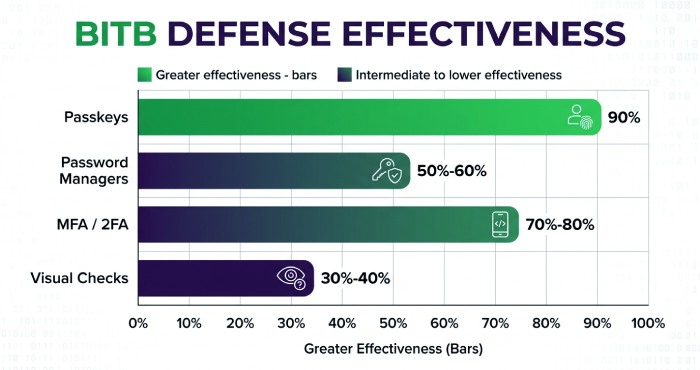
A password manager such as Kaspersky Password Manager can still help, because it may refuse to auto-fill credentials into the wrong domain. But if the victim manually types their password into the fake authentication page, the protection is weaker.
MFA and 2FA Help, But They Are Not Perfect
Multi-factor authentication, two-factor authentication, MFA, and 2FA reduce the damage from credential theft, but they do not eliminate the risk. Some phishing kits can prompt for an Authenticator App code or CAPTCHA after stealing the password. If the attacker captures the one-time code quickly, they may attempt account takeover before the code expires.
Stronger authentication methods such as passkeys are more resistant because they are bound to the legitimate domain. A unique password for every service also limits the blast radius if user credentials are stolen.
Social Engineering Is More Sophisticated
BitB attacks rely heavily on social engineering. The victim sees a believable website, clicks a familiar “sign in with” button, and is presented with a convincing login pop-up. The fake login window feels expected, the fake authentication page looks branded, and address bar spoofing reduces suspicion.
Traditional phishing often asks users to ignore obvious warning signs. Browser-in-the-browser phishing removes many of those signs through visual spoofing and precise imitation.
Practical Ways to Spot and Defend Against Browser-in-the-Browser Attacks
Defending against browser-in-the-browser phishing requires a mix of user awareness, technical controls, and security best practices.
Check Whether the Login Window Is Real
A genuine browser login pop-up is a separate browser window. A fake login window in a BitB attack is trapped inside the original page. Try moving the window outside the browser viewport. If it cannot leave the page area, it may be a fake pop-up.
Also check the real browser address bar, not just the address shown inside the login pop-up. Address bar spoofing only works inside the fake interface; it cannot change the actual browser chrome.
Use Password Managers, Passkeys, and Strong Authentication
A reputable password manager can help identify a fake website because it will not offer auto-fill credentials on an unrelated domain. Use a unique password for each account, enable MFA or 2FA where available, and adopt passkeys for services that support them.
For high-value accounts such as Microsoft, Google, Apple, Gmail, Facebook, Meta, and Steam, stronger authentication can reduce the chance that credential theft leads to account takeover.
Watch for Behavioral Red Flags
Be cautious if a login pop-up appears after clicking a link from email phishing, Telegram, Microsoft Teams, or an unexpected message. Treat prompts from a compromised website or unfamiliar fake portal with suspicion. A CAPTCHA, urgent warning, or request for sensitive information can be part of the social engineering flow.
Use Browser Security Tools and Anti-Phishing Controls
Keep Chrome and other web browsers updated. Use trusted browser extensions, anti-phishing tools, endpoint protection, and DNS filtering where appropriate. Organizations should train employees to recognize browser-in-the-browser phishing, not just traditional phishing pages.
Security teams should also monitor for suspicious SSO activity, impossible travel, unusual device fingerprints, and repeated failed login attempts. If a BitB attack succeeds, fast detection can limit data theft, credential harvesting, network access abuse, and secondary attacks by attackers.
General Manager
General Manager of DuoCircle. Product strategy and commercial lead across DuoCircle's 2,000+ customer base.
LinkedIn Profile →Protect your inbox from phishing attacks
Real-time email security with 60-day free trial. No credit card required.