Phishing Link Analysis: How Security Tools Detect Malicious URLs Before You Click

Quick Answer
Phishing link analysis examines URLs, domains, redirects, reputation, and page behavior to identify malicious links. Security tools use these signals to detect phishing threats and warn users before they click.
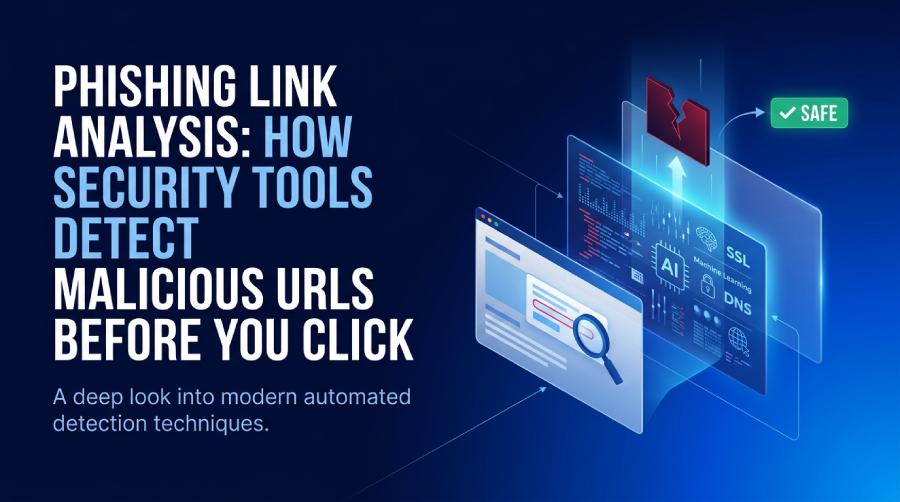
Phishing link analysis is the process of inspecting a URL, its destination, its reputation, and the behavior of the page behind it to determine whether it is safe, suspicious, or malicious. Modern phishing attacks often arrive through email phishing, SMS, social media messages, QR codes, ads, collaboration tools, or fake brand pages impersonating companies such as Adobe, Facebook, Roblox, YouTube, or financial institutions.
A phishing link checker or phishing link scanner helps users and security teams detect phishing URLs before someone enters credentials, payment details, or sensitive business data. This matters because malicious links can lead to identity theft, account takeover, malware installation, and financial loss. A convincing scam website may look like a secure website at first glance, especially when it uses HTTPS, a realistic login page, or copied brand assets.
Why visual inspection is not enough
Traditional “naked eye phishing detection” is unreliable. Attackers use misspelled words sparingly, hide grammatical errors, and register domains that visually resemble trusted brands. They may mix Cyrillic script and Latin script, use lookalike characters, or create a deceptive brand link that appears legitimate in a mobile preview.
A suspicious URL might redirect through several tracking domains before landing on a malicious website. In other cases, malicious websites display harmless content to security crawlers but show credential-harvesting pages to real users. This is why phishing link analysis relies on automated URL analysis, threat detection, pattern recognition, and machine learning rather than appearance alone.
An AI-powered checker can evaluate far more signals than a human can process manually. A phishing link checker provides real-time results, helping users make decisions before they click. For organizations, phishing link analysis supports personal information security, online content safety, and risk elimination across email, browsers, and endpoint devices.
Common risks behind malicious links
Malicious links are designed to trigger action: “verify your account,” “claim a reward,” “reset your password,” or “open this shared document.” These phishing attempts may lead to credential theft, identity theft, business email compromise, or malware downloads on Windows, macOS, or Android devices.
Attackers frequently target well-known ecosystems, including Microsoft 365, Google Workspace, Adobe, Facebook, Roblox, and banking portals. A scam website checker, phishing and scam link checker, or enterprise-grade phishing link scanner can identify a suspicious link before the user submits personal information. Without that control, a single click can cause identity theft, account compromise, and financial loss.
Key URL Signals Security Tools Examine
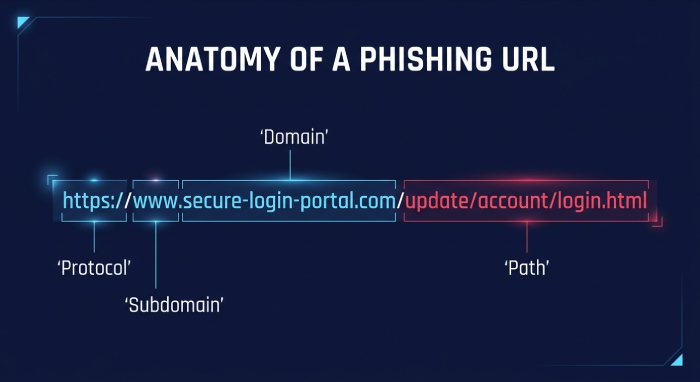
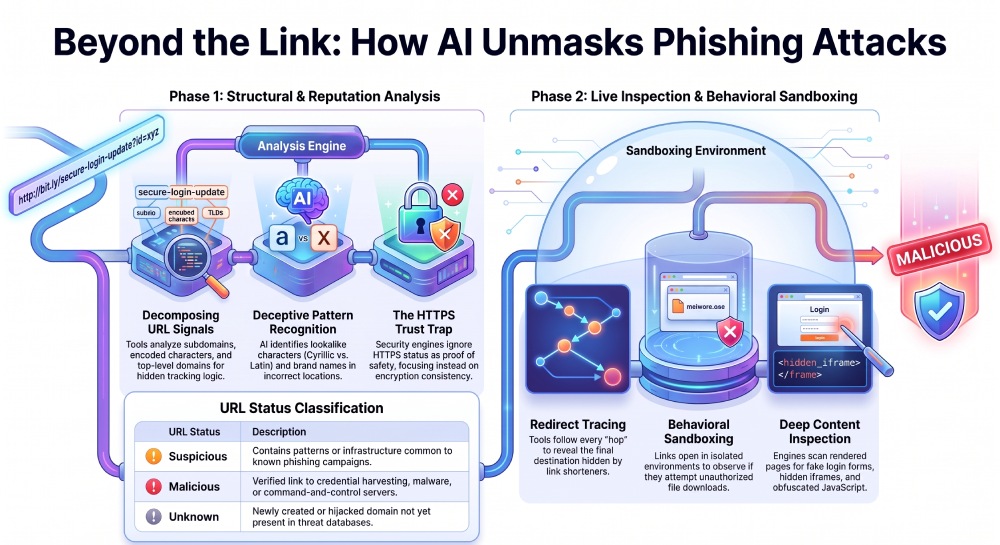
Security tools begin phishing link analysis by decomposing the URL into its components: protocol, hostname, subdomain, path, query strings, parameters, and fragments. This URL extraction step helps determine whether the original URL is trustworthy, whether it hides tracking logic, and whether it leads to a redirected URL.
A phishing link scanner looks for malicious elements such as encoded characters, excessive subdomains, misleading keywords, IP-address URLs, shortened links, and strange top-level domains. A phishing link checker may also compare the domain against known brand patterns and historical abuse indicators.
Domain, structure, and pattern analysis
A suspicious URL often includes urgency words, brand names in the wrong location, or confusing domain construction. For example, a fake login page may use a structure like facebook-security-login.example.com, where “Facebook” appears in the subdomain rather than the registered domain. Tools use pattern analysis to distinguish a good link from a suspicious link.
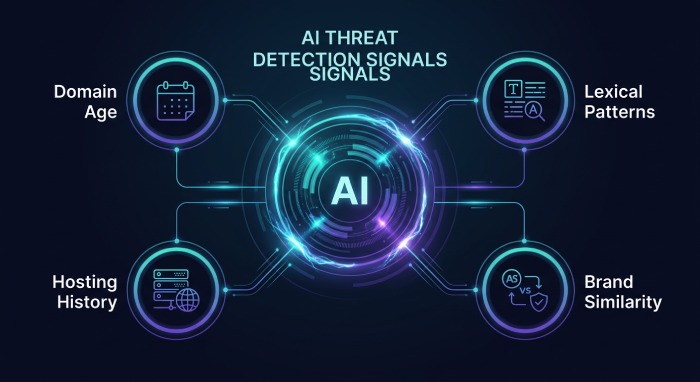
A machine-learning algorithm can analyze lexical patterns, domain age, DNS records, hosting history, and page similarity. This type of AI-powered checker uses machine learning and AI-driven phishing scam detection to identify malicious links even when they are not yet listed in a phishing URL database.
Some phishing campaigns imitate beverage and retail brands such as Jupiler, Anadolu Efes, Herbgear, or Ozujsko, especially in regional scams. Attackers may register domains using Cyrillic script characters that resemble Latin script letters, making phishing recognition difficult for users.
HTTPS, SSL, and deceptive trust signals
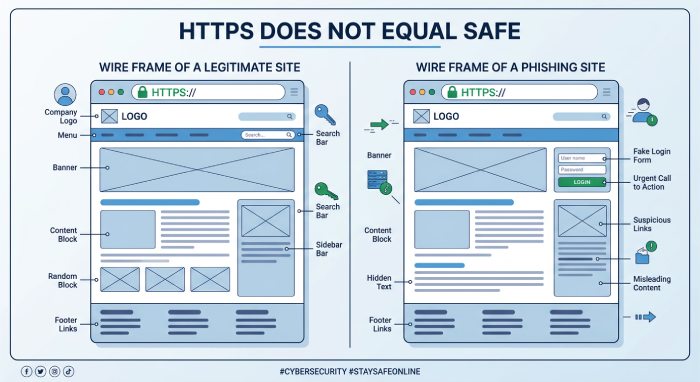
An HTTPS site is not automatically safe. Many malicious websites now use HTTPS and a valid SSL certificate because certificates are easy to obtain. Security tools examine whether the SSL certificate matches the claimed organization, whether the certificate was recently issued, and whether the site downgrades from HTTPS to HTTP during redirects.
A scam website checker will not treat HTTPS alone as proof of safety. Instead, the tool evaluates data encryption alongside domain reputation, hosting behavior, URL status, and page content. A secure website should have consistent identity signals, not just SSL.
What “safe” really means in URL status
When a link tester tool returns a URL status, it may classify the result as safe, suspicious, malicious, unavailable, or unknown. Real-time results are important because phishing-reported sites change rapidly. A link that looked like a good link yesterday may become a malicious website today if the domain is hijacked or repurposed.
Reputation Checks, Threat Intelligence, and Blocklists
Reputation analysis is a major part of phishing link analysis. Security platforms check URLs, domains, IP addresses, and file hashes against a database of known phishing websites, malware hosts, spam infrastructure, and command-and-control servers. This may include commercial threat intelligence, open-source feeds, browser blocklists, and a phishing URL database built from previous phishing attempts.
A phishing link checker or phishing link scanner may compare a suspicious URL with phishing-reported sites from multiple sources. Tools from vendors and platforms such as Bolster AI, EasyDMARC, and PowerDMARC often focus on brand abuse, domain impersonation, and email authentication signals. For email security, DMARC, SPF, and DKIM help verify whether a message claiming to come from a brand is actually authorized.
Threat intelligence and brand impersonation
Brand impersonation is one of the strongest signals in phishing scam detection. If a page copies Adobe branding, embeds a fake Facebook login, references Roblox rewards, or uses a fake YouTube verification flow, an AI-powered checker can compare the page against known legitimate brand assets.
A phishing link scanner can also identify infrastructure reuse. Attackers often recycle hosting providers, URL paths, JavaScript kits, favicon files, and phishing templates. Reputation systems help detect phishing URLs faster by correlating new malicious links with old campaigns.
A scam website checker that provides real-time results can alert users before the browser loads the destination. This security alert may prevent identity theft, credential harvesting, and financial loss. The most effective systems combine static reputation checks with live inspection because malicious websites are frequently created and abandoned within hours.
Sandboxing, Redirect Tracing, and Page Content Inspection
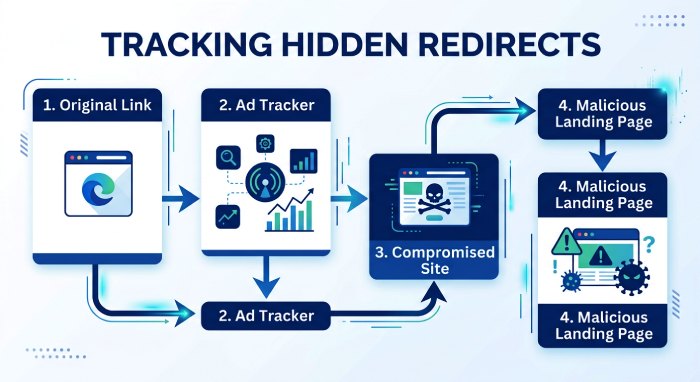
Some malicious links do not reveal their final destination immediately. They may use link shorteners, advertising networks, compromised websites, or conditional redirects. Sandboxing allows a security engine to open the original URL in an isolated environment, trace each redirected URL, and observe page behavior without exposing the user.
A phishing link scanner may simulate different devices, geographies, browsers, and user agents. This is important because a malicious website may show a harmless page to a data center crawler but show a credential form to a mobile user on Android.
Redirect tracing and behavior analysis
Redirect tracing records every hop between the original URL and the final landing page. Security tools inspect whether a suspicious URL passes through newly created domains, cloaking services, or compromised legitimate sites. They also check whether the page attempts to download files, request notification permissions, launch pop-ups, or load malicious elements from external servers.
An AI-powered checker can combine behavior analysis with pattern recognition to determine whether the destination is a scam website. Real-time results are especially useful when users paste links into a link safety checker before opening them. Many tools let users copy and paste URL strings directly into a phishing link checker, making it easy to scan URLs from emails, chats, or documents.
Page content, scripts, and form inspection
Content inspection looks at the rendered page, not just the URL. A phishing link analysis engine may detect fake login forms, password fields, payment forms, hidden iframes, obfuscated JavaScript, or cloned brand pages. It may also identify legitimate third-party services such as Google reCAPTCHA, CookieYes, Mouseflow, or Freshdesk that have been abused or imitated to make malicious websites appear trustworthy.
Some phishing pages embed fake support widgets, cookie banners, or CAPTCHA challenges to delay detection. Others use reCAPTCHA-like screens before redirecting victims to credential theft forms. A scam website checker evaluates these signals together rather than treating any one feature as proof of legitimacy.
Best Practices for Users and Organizations to Reduce Click Risk
Users should avoid clicking unexpected links, especially those requesting passwords, payment details, or identity documents. Before opening a suspicious URL, use a phishing link checker, phishing link scanner, scam website checker, or phishing and scam link checker to verify the destination. If possible, hover to check URL previews on desktop devices and compare the displayed domain with the expected official domain.
Organizations should train employees to recognize malicious links, suspicious link patterns, misspelled domains, and social engineering tactics as part of their phishing protection strategy. Security awareness should include phishing statistics, real examples of phishing attacks, and practical phishing recognition exercises. Employees should know how to report phishing attempts and what to do after a security alert.
Technical controls are equally important. Companies should deploy secure email gateways, browser isolation, DNS filtering, endpoint protection, and automated URL analysis. They should enforce DMARC, SPF, and DKIM to reduce spoofed email phishing. Security teams should also use threat intelligence, phishing-reported sites, and a database of known phishing websites to detect malicious websites quickly.
For higher-risk environments, integrate a link safety checker into email, chat, and collaboration platforms. A phishing link scanner with real-time results can rewrite or detonate links at click time, ensuring that the URL status is checked at the moment of access. This is critical because malicious links may be weaponized after delivery.
The safest workflow is simple: pause, verify the sender, inspect the domain, use a phishing link checker, and avoid entering credentials unless you are certain the site is legitimate. When in doubt, navigate directly to the official website instead of trusting a message link. This combination of user caution, AI-powered checker technology, and layered threat detection is the most effective way to avoid phishing scams, protect personal information security, and reduce the risk of identity theft.
General Manager
General Manager of DuoCircle. Product strategy and commercial lead across DuoCircle's 2,000+ customer base.
LinkedIn Profile →Protect your inbox from phishing attacks
Real-time email security with 60-day free trial. No credit card required.