Malicious Redirect Detection: How To Identify Hidden Phishing Threats

Quick Answer
Malicious redirect detection helps identify links that secretly send users to phishing or fraudulent websites. By checking redirect chains, URLs, domains, and destination behavior, organizations can uncover hidden threats and reduce the risk of credential theft, malware, and fraud.

A malicious redirect is a forced or hidden website redirect that sends visitors from an expected page to an attacker-controlled destination. In phishing campaigns, attackers use a malicious redirect to move users from a trusted-looking domain to a fake login page, payment form, malware download, or fraudulent support portal. The victim may click a familiar-looking link, pass through several redirect URL hops, and land on a page designed to steal credentials or session data.
Attackers favor redirects because they help disguise the final redirect location. A link may begin on a compromised WordPress site, pass through Redacted.com-style tracking URLs, and end on a phishing page. This URL manipulation makes security verification harder for users and automated tools. It also helps attackers evade blocklists used by Google, Bing, Yahoo, MSN, AOL, Chrome Safe Browsing, and email gateways.
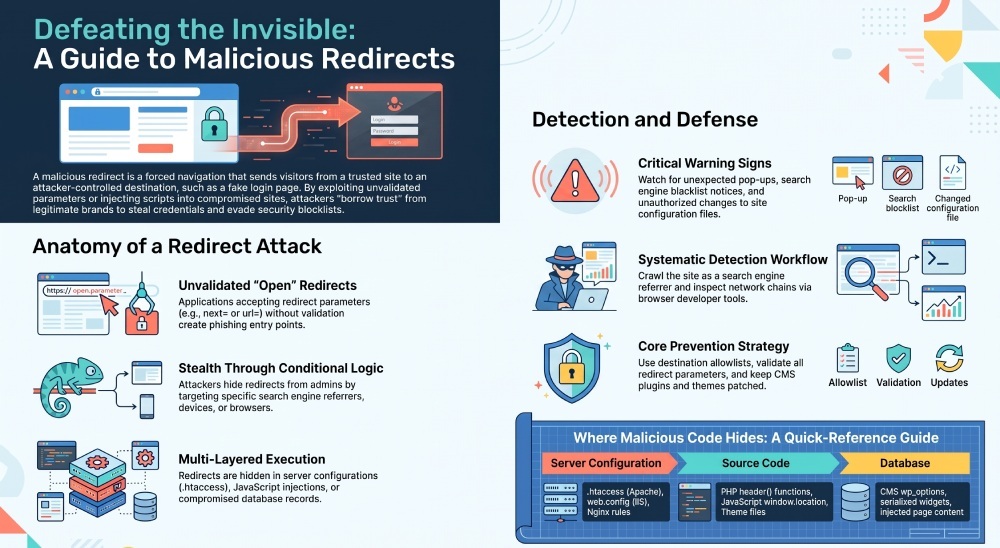
A redirect vulnerability often begins as an unvalidated redirect, also called an open redirect. If an application accepts a redirect parameter such as next=, returnUrl=, or url= without proper data validation, attackers can send users to an unsafe redirect destination. OWASP highlights this risk in its Cheat Sheet Series because an unvalidated redirect can support phishing, account takeover, and a forward attack where users trust the original domain but are forwarded to a dangerous redirect.
Redirect abuse in phishing campaigns
Phishing operators use a malicious redirect to borrow trust from legitimate brands. For example, a victim may see a link from a known domain, but the website redirect silently forwards them to a fake Microsoft 365, banking, or shipping portal. The first URL looks safe; the final page is not.
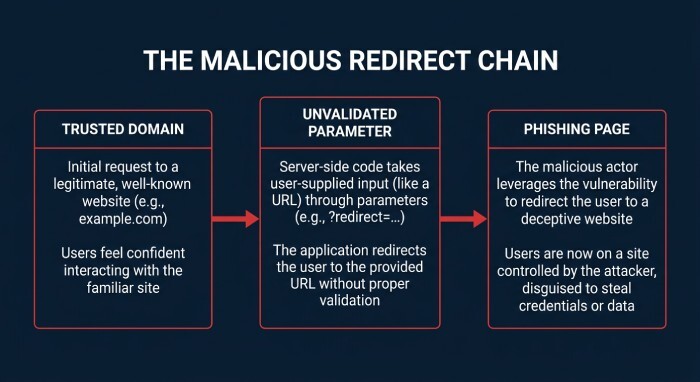
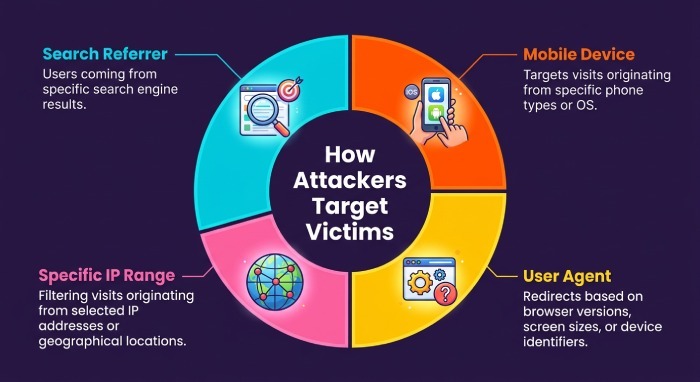
This technique is especially effective when combined with obfuscated code, a hidden malicious script, or script injection in a compromised website. A site infection can inject a JavaScript redirect into templates, widgets, advertising slots, or database content. Once the site infection is active, visitors may be selectively redirected based on location, device type, or browser user agent.
How unvalidated redirects become security flaws
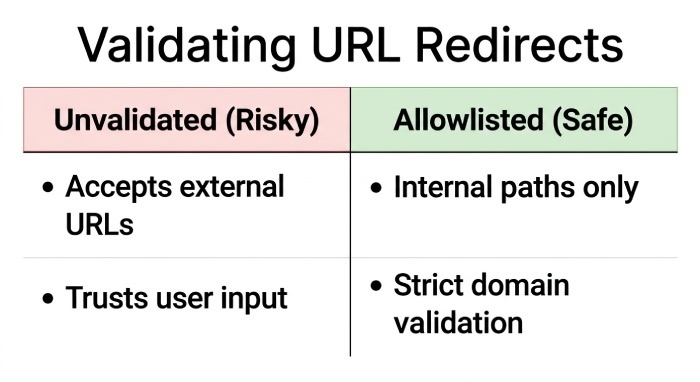
An unvalidated redirect becomes dangerous when an application trusts user-supplied destinations. Developers may implement redirects using PHP’s header() function, ASP .NET’s Response. Redirect, Java servlet redirects, Rails controller redirects, or Rust frameworks such as actix web. These features are legitimate, but without allowlisting and normalization, they create a redirect vulnerability.
Framework-level redirect sinks to review
Security teams should review redirect sinks across PHP, Java, ASP .NET, Rails, and Rust codebases. A safe redirect should use internal paths or approved domains only. Any unvalidated redirect that accepts full external URLs should be treated as a site vulnerability until proven otherwise.
Common Redirect Techniques That Hide Phishing Pages
Attackers use many redirect techniques to conceal phishing pages and delay redirect detection. Some rely on server configuration, while others use client-side code, database content, or advertising systems.
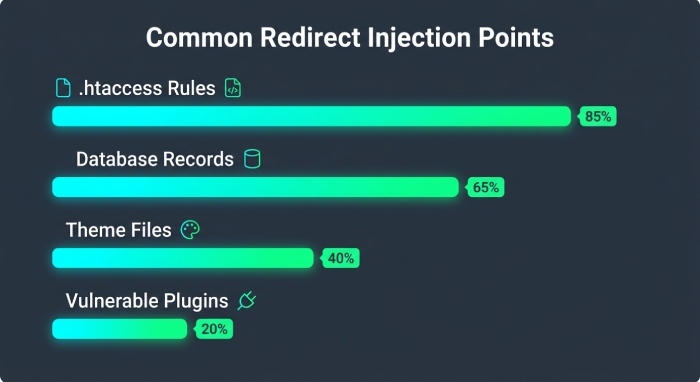
A common pattern is the .htaccess file redirect on Apache servers. By abusing RewriteEngine rules, attackers can redirect only mobile users, first-time visitors, or traffic from search engines like Google and Bing. This makes the malicious redirect harder for administrators to reproduce.
Another common method is script injection. A compromised plugin, theme, or content editor may insert a redirect script into pages. In WordPress, a theme file infection or plugin vulnerability can add a JavaScript redirect that fires after the page loads. The redirect script may be hidden with code obfuscation, packed strings, Base64 fragments, or misleading variable names. This obfuscated code can make the malicious redirect appear like analytics, tracking, or advertising logic.
Server-side, client-side, and database-based tricks
Server-side redirects may appear in PHP files, Java controllers, ASP .NET handlers, Rails routes, or web server rules. Client-side redirects may use meta refresh tags, JavaScript window.location, or delayed navigation events. Database-based redirects are also common: a database injection may modify posts, options, widgets, or serialized configuration values inside a content management system.
On WordPress sites, administrators may find the infection in wp_options, page content, theme files, or plugin settings. Tools such as phpMyAdmin, a SQL management tool, or another database tool can help identify suspicious entries, but changes should be made carefully and only after creating a site backup.
Conditional redirects and cloaking
Advanced attackers often use conditional logic to hide a site infection from administrators. A referrer-based redirect may activate only when traffic comes from Google, Yahoo, MSN, AOL, or Bing. A browser-specific redirect may target Chrome on Windows while ignoring logged-in administrators. Some scripts check cookies, IP ranges, or the browser user agent before triggering the malicious redirect.
When advertising redirects become malware delivery
Not every advertising redirect is malicious, but compromised ad tags and Malicious Advertising campaigns can turn an ad network redirect into one that sends users to exploit kits, fake updates, or credential-harvesting pages. An Ad network should be monitored closely when unexpected pop-ups, forced navigation, or malware warnings appear.
Warning Signs of Suspicious Links, Domains, and URL Chains
The most visible warning sign is a link that does not land where expected. Multiple URL hops, shortened links, strange query strings, and mismatched domains can indicate an unsafe redirect. A suspicious redirect URL may contain encoded characters, nested URLs, excessive parameters, or a redirect parameter pointing to an unrelated domain.
For website owners, signs of a site infection include unexpected pop-ups, antivirus warnings, search engine blacklist notices, traffic drops, and reports from visitors. A malicious redirect may also cause intermittent behavior: the site works normally for administrators but redirects new visitors. In other cases, a broken website redirect may produce a server error such as an Internal Server Error, especially if attackers damaged server configuration files.
Security teams should also watch for unexpected changes in site files, unfamiliar PHP files, newly modified theme assets, suspicious JavaScript, and hidden Backdoors. A backdoor may recreate the malicious redirect after cleanup, causing repeated redirect removal failures. If redirect removal does not last, assume the site infection still has persistence.
Other red flags include:
- Redirect chains that move through unrelated domains before reaching a phishing page
- Obfuscated code in headers, footers, theme files, or CMS content blocks
- Unknown administrator accounts or modified plugin files
- New redirect rules in .htaccess, web.config, or Nginx configuration
- JavaScript redirect behavior that appears only for anonymous visitors
- Search results showing spam titles, pharmaceutical keywords, or fake brand pages
Tools and Methods for Detecting Malicious Redirects
Effective redirect detection combines automated scanning, manual inspection, and behavioral testing. No single tool catches every malicious redirect because attackers intentionally vary behavior by IP address, referrer, browser, or session.
Start by testing the suspicious link in a controlled environment. Use Chrome developer tools to inspect the network chain and identify each website redirect. Record every redirect URL, status code, and final redirect location. DNS tools such as WhatsMyDNS can help identify suspicious domain changes or propagation issues, especially when attackers alter DNS records.
For WordPress environments, Wordfence can detect malware signatures, plugin vulnerability indicators, modified core files, and known malicious script patterns. A broader site scan should include server files, CMS directories, uploads, plugins, themes, and database records. Administrators using cPanel, FTP, or a hosting file manager should inspect recently modified files and compare them against clean versions.
Manual inspection and site scanning workflow
A practical workflow for redirect detection includes:
- Crawl the site as a normal visitor and as a search-engine referrer.
- Test with different browser user agent strings and devices.
- Review .htaccess, web.config, and application routing files.
- Search site files for window.location, document.location, eval, encoded strings, and suspicious external domains.
- Check the database through phpMyAdmin or another SQL management tool for injected scripts.
- Compare WordPress core, plugin, and theme files against known-good versions.
- Look for backdoor files that could restore the malicious redirect.
During analysis, remember that obfuscated code is not always malicious, but unexpected obfuscated code in a CMS template, plugin directory, or content editor field deserves investigation. Similarly, a legitimate JavaScript redirect can support site functionality, but a hidden JavaScript redirect pointing to an unknown host is a strong indicator of compromise.
Best Practices to Prevent Redirect-Based Phishing Attacks
Preventing redirect-based phishing requires phishing protection, secure development, continuous monitoring, and disciplined incident response. The most important control is to eliminate every unnecessary unvalidated redirect. If redirects are required, use an allowlist of approved destinations and reject external URLs by default. A safe redirect should preserve core functionality without allowing attackers to control the destination.
Developers should validate redirect parameters, normalize URLs before comparison, and avoid trusting user-supplied domains. OWASP guidance recommends mapping short internal identifiers to known destinations instead of accepting arbitrary URLs. This reduces the risk of a redirect vulnerability and limits URL manipulation.
For website owners, keep the content management system, plugins, themes, and server software patched. Many malicious redirect incidents begin with a plugin vulnerability, weak credentials, exposed admin panels, or outdated CMS components. Restrict write permissions, remove unused extensions, and monitor changes to site files. If a malicious redirect appears, perform redirect removal only after preserving evidence and taking a site backup.
To remove malicious redirect code safely, identify the entry point, clean infected files, remove database injection content, rotate passwords, and close the original site vulnerability. If needed, use a professional Site Cleaning Service for full site cleaning, malware removal, and validation. After cleanup, restore site content from a clean backup only if the backup predates the infection. Otherwise, the same obfuscated code, script injection, or backdoor may return.
Strong prevention also includes:
- Web application firewall rules for known redirect abuse patterns
- Security verification of new plugins, themes, and ad network tags
- Monitoring for unauthorized .htaccess file redirect changes
- Alerts for modified PHP, JavaScript, and configuration files
- Regular backups stored outside the hosting account
- Periodic redirect detection tests across devices, referrers, and geographies
A malicious redirect is rarely just a nuisance. It can signal malware, credential theft, and a deeper site infection. Treat every unexpected website redirect, JavaScript redirect, script injection, and unvalidated redirect as a potential compromise until redirect detection confirms the source and redirect removal is complete.
General Manager
General Manager of DuoCircle. Product strategy and commercial lead across DuoCircle's 2,000+ customer base.
LinkedIn Profile →Protect your inbox from phishing attacks
Real-time email security with 60-day free trial. No credit card required.