How Malicious Ads Redirect Users to Fake Websites

Quick Answer
Malvertising uses malicious or deceptive ads to redirect users to fake websites, phishing pages, or malware downloads. Phishing protection, ad blocking, safe browsing, software updates, and layered cybersecurity can help reduce these risks.
Phishing does not always begin with an email. Sometimes, it starts with an advertisement.
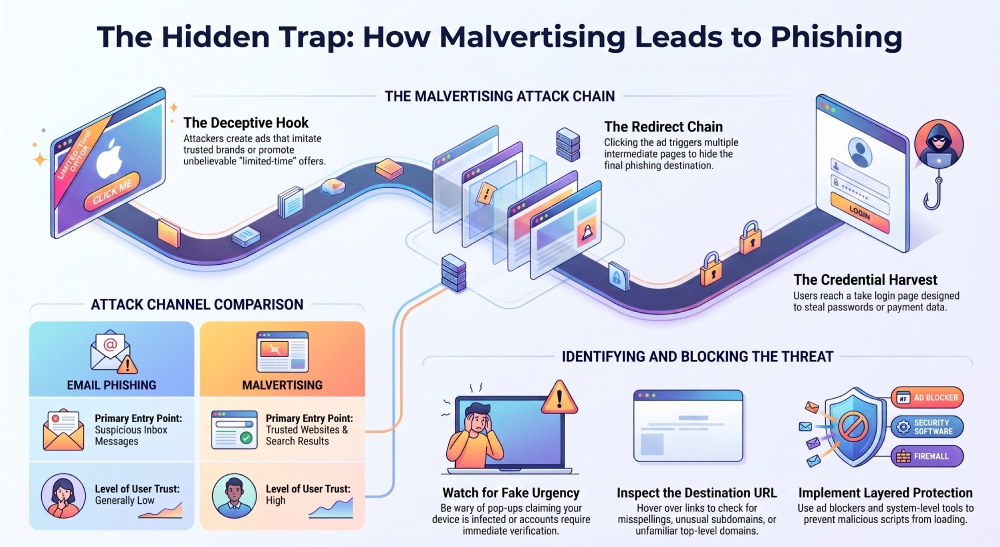
A malicious ad can appear on a legitimate website, in a search result, inside a mobile app, or through a social media feed. It may promote a fake security update, a fraudulent investment opportunity, a giveaway, or a familiar software brand. After a user clicks, the ad can redirect them through several intermediate pages before opening a convincing phishing site.
This technique is known as malvertising. It combines online advertising with malicious code, deceptive landing pages, or redirect chains designed to steal credentials, distribute malware, or trick users into making unauthorized payments.
What Is Malvertising?
Malvertising is the abuse of digital advertising to deliver harmful content or direct users to unsafe websites. Unlike ordinary phishing messages, malicious ads can reach people while they are browsing websites they normally trust.
Attackers may purchase advertising space, compromise an advertising network, inject scripts into a vulnerable website, or create fake ads that imitate well-known brands. In some cases, the advertisement looks harmless until the user clicks it. In others, a script silently checks the visitor’s device, location, browser, or referral source before deciding whether to show a redirect.
This selective behavior makes malvertising difficult to detect. A publisher or security researcher may see a normal page, while a visitor from a particular country or device is sent to a fake login form or a malware download.
How Malicious Ads Create Phishing Risk
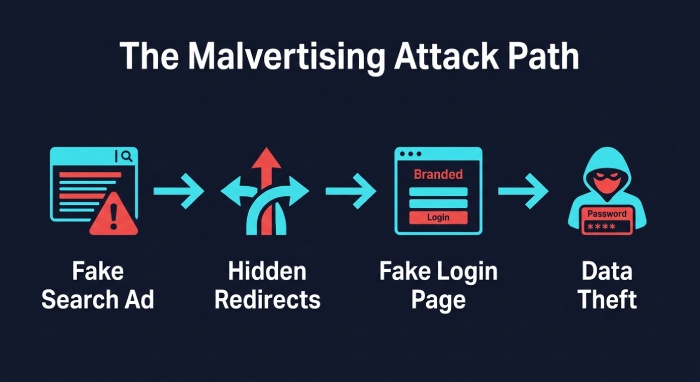 A typical malvertising campaign may follow this sequence:
- An attacker creates an advertisement that imitates a trusted company or uses an attractive offer.
- The ad is placed on a website, search platform, mobile application, or advertising network.
- A user clicks the ad or an injected script activates a redirect.
- Several tracking or traffic-distribution pages hide the final destination.
- The user reaches a fake login page, payment form, technical-support page, or software download.
- The attacker collects credentials, payment information, or access to the device.
The final page may copy the branding of a bank, cloud service, cryptocurrency platform, delivery company, or business application. It may use HTTPS, a professional design, and familiar wording. None of these details proves that the site is legitimate.
Search advertising can be particularly dangerous because fake pages may appear above organic results. Users often trust prominent placements and may click without checking the domain carefully. A phishing campaign can therefore target people who never received a suspicious email at all.
Common Malvertising Warning Signs
No single sign confirms that an advertisement is malicious, but several indicators should encourage caution.
Fake urgency
The ad may claim that your device is infected, your subscription is expiring, your account requires verification, or a limited-time offer will disappear within minutes. Urgency is intended to prevent careful review.
Unexpected security warnings
Browser pop-ups that announce viruses, expired licenses, or urgent system problems are common social-engineering tools. A website cannot reliably determine that your operating system is infected simply because you opened a page.
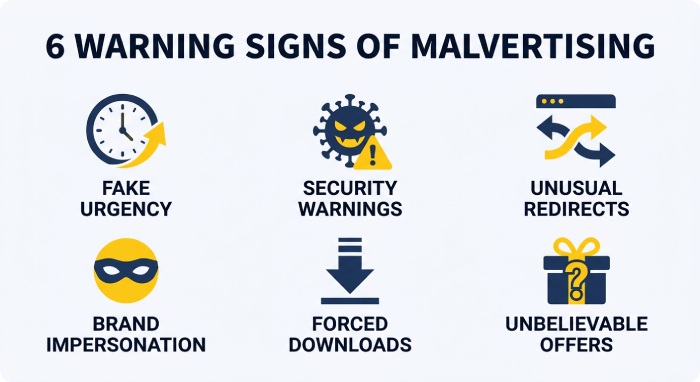
Unusual redirects
A click may open several new tabs, switch to an unfamiliar domain, or send you to a page that does not match the advertisement. Redirect chains can be used to conceal the final phishing destination and make investigation more difficult.
Brand impersonation
Fake advertisements often use a familiar logo, a similar domain name, copied product screenshots, or a misspelled brand. Check the actual domain rather than relying on the visual appearance of the page.
Forced downloads or extensions
Be cautious if a page asks you to install an unfamiliar browser extension, update a media player, download a security tool, or enable notifications before continuing. These requests may lead to unwanted software or persistent browser abuse.
Unbelievable offers
Large discounts, guaranteed investment returns, free prizes, and urgent refunds are frequently used to encourage clicks. Verify the offer through the company’s official website instead of using the advertisement.
Why a Safe Website Can Still Display a Dangerous Ad
A legitimate publisher does not necessarily control every advertisement shown on its pages. Advertising inventory can be supplied dynamically by third-party networks, and attackers may exploit weaknesses in the chain between advertiser, platform, and publisher.
Websites can also be compromised. An injected script may load a malicious ad, create a pop-up, or redirect selected visitors. In other cases, the ad itself is legitimate at first and later modified after it has passed an initial review.
This is why users should not treat the reputation of the website they are visiting as proof that every link or advertisement on the page is safe. A trusted news website, blog, forum, or streaming site can still contain a harmful advertising request.
How to Reduce Malvertising and Phishing Exposure
Do not interact with alarming pop-ups
Close the tab instead of calling a number, downloading a file, or following instructions in a browser warning. If the tab does not close normally, use the browser’s task controls or close the browser window. Do not grant notification permissions to an unfamiliar site.
Inspect the destination
Hover over a desktop link or press and hold carefully on a mobile device to preview the URL. Look for misspellings, unexpected subdomains, URL shorteners, unusual top-level domains, and redirects. When an ad claims to represent a company, navigate to that company’s official domain manually.
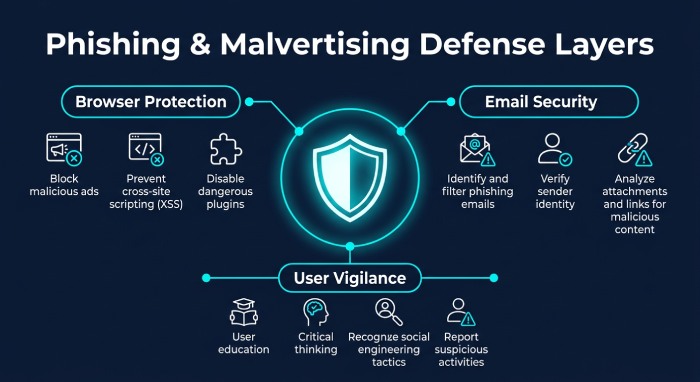
Use browser and system-level protection
Built-in browser Safe Browsing features can warn about known deceptive websites and dangerous downloads. Ad blockers provide another layer by preventing intrusive ads, pop-ups, trackers, and some advertising scripts from loading.
For example, AdLock combines ad blocking with safe browsing protection. It can block intrusive ads, pop-ups, trackers, and potentially harmful ad scripts, while checking suspicious URLs against a continuously updated database of unsafe websites. Depending on the platform and configuration, AdLock can warn users about or block known phishing pages, malicious websites, harmful redirects, and other unsafe web resources before they load.
This type of protection can reduce the number of malicious advertising requests that reach the browser and make deceptive redirects less likely. It should be treated as one layer of defense, not as a replacement for email security, browser updates, endpoint protection, or careful verification.
Keep software updated
Update browsers, operating systems, extensions, and security software promptly. Malvertising campaigns may target vulnerabilities in browsers, plugins, or outdated components. Remove extensions you no longer use and install new ones only from official stores or verified developer pages.
Use layered email security
Email remains one of the most effective delivery channels for phishing. Businesses should combine secure email gateways, URL analysis, attachment scanning, sender authentication, employee reporting, and time-of-click protection.
Email protection helps stop a malicious link before it reaches an inbox. Browser protection helps reduce risk when a user encounters a dangerous website through search results, advertising, social media, or a compromised page. These controls address different stages of the attack and work best together.
What to Do If You Reach a Fake Website
If a suspicious page opens, do not enter credentials, payment details, recovery codes, or personal information. Close the page and avoid downloading any file it recommends.
If you entered a password, change it immediately from a trusted device and enable multifactor authentication. Revoke active sessions where the service allows it and review recent account activity. If payment information was submitted, contact the financial institution using an official phone number or website.
If a file was downloaded, do not open it. Disconnect the device from the network if appropriate for your environment and contact your IT or security team. Businesses should preserve the original message, URL, redirect chain, and relevant browser or email logs for investigation.
Report the fraudulent page or advertisement to the affected brand, advertising platform, browser provider, or relevant security service. Reporting helps improve detection and may shorten the life of an active campaign.
Ad Blocking Is Helpful, but Not Sufficient
Ad blocking can remove an important route to malicious websites, especially when attacks depend on pop-ups, deceptive banners, tracking scripts, or redirect chains. Safe Browsing and URL reputation checks can provide additional warnings before a known dangerous page loads.
However, no single tool catches every phishing campaign. Newly created domains, compromised legitimate websites, malicious email links, and attacks that activate only after a page loads can bypass individual controls. The strongest approach combines email security, browser protection, updated software, multifactor authentication, password hygiene, and user awareness.
Malvertising can turn an ordinary browsing session into a potential phishing delivery channel. By treating unexpected ads, pop-ups, and redirects with the same caution as suspicious emails, and by implementing phishing protection alongside layered cyber security measures, users and organizations can reduce the risk of a deceptive click leading to stolen credentials, compromised accounts, or infected devices.
General Manager
General Manager of DuoCircle. Product strategy and commercial lead across DuoCircle's 2,000+ customer base.
LinkedIn Profile →Protect your inbox from phishing attacks
Real-time email security with 60-day free trial. No credit card required.