How Baiting Attacks Exploit Employee Curiosity At Work

Quick Answer
Baiting attacks exploit employee curiosity by using enticing offers, free gifts, infected USB drives, or fake downloads to lure workers into unsafe actions. These social engineering tactics can steal credentials, expose sensitive data, install malware, and compromise workplace security.
Baiting attacks use curiosity, trust, or urgency to persuade employees to click malicious links, download files, or connect unknown devices. Knowing how these attacks work, why they can be effective, and what risks they pose helps organizations build security awareness and prevent costly cyber incidents.
Quick Answer: What Makes Baiting So Effective?
A baiting attack tricks an employee into taking an action because the offer, file, device, message, or link looks useful, urgent, rewarding, or harmless. It sits inside social engineering, the wider set of attacks that rely on human behavior rather than only technical flaws.
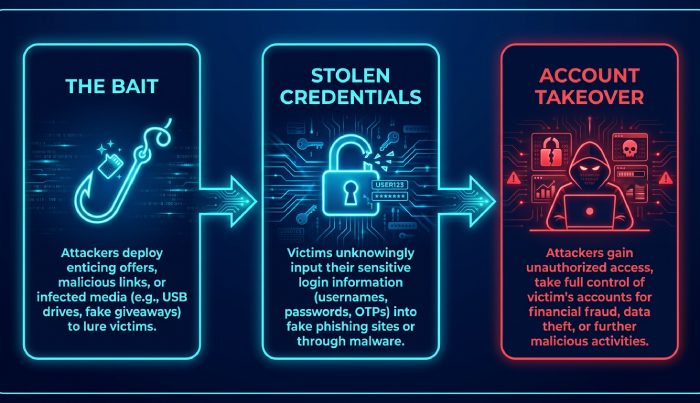
At work, baiting often blends phishing, malware, and credential theft. A cybercriminal may use a fake invoice, a “shared” Google Docs file, a QR code, a USB drive, or a fake HR portal to steal credentials, personal information, financial information, and other sensitive information. From there, the damage can lead to identity theft, account takeover, payroll fraud, data breaches, and compliance exposure.
The short version
Employees usually take the bait because it feels normal
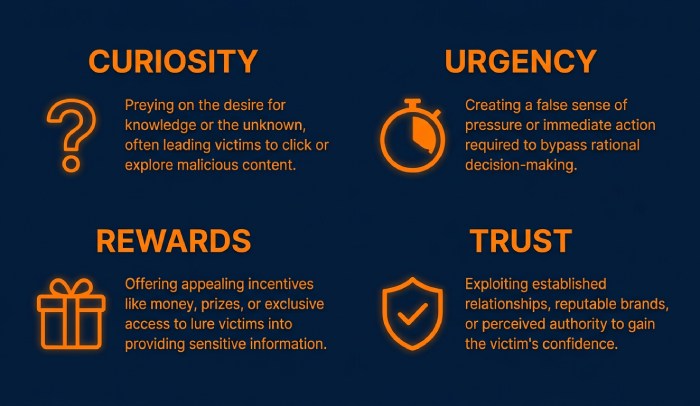
A file looks like it came from Google. A message uses spoofed branding. A free offer seems tied to a company event. A pop-up notification warns that access will expire. That mix of curiosity, urgency, and trust is what gives a baiting attack its power.
The best defense is layered
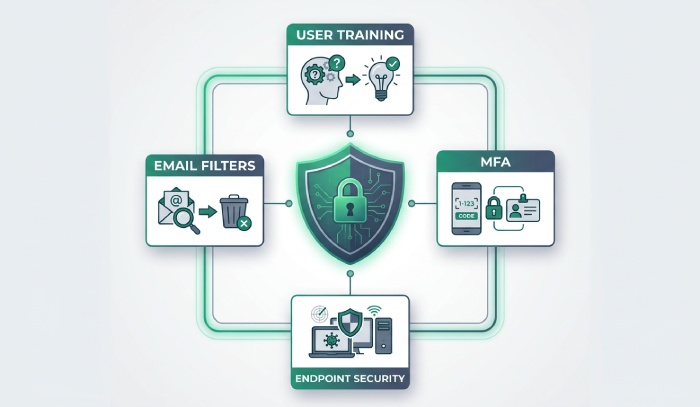
Use security awareness training, multifactor authentication (MFA), email security filtering, anti-phishing tools, anti-malware tools, endpoint protection, firewalls, and clear reporting habits. Strong tooling matters, but so does a workforce that pauses before clicking.
What Is a Baiting Attack? Definition, Goals, and How It Fits Into Social Engineering
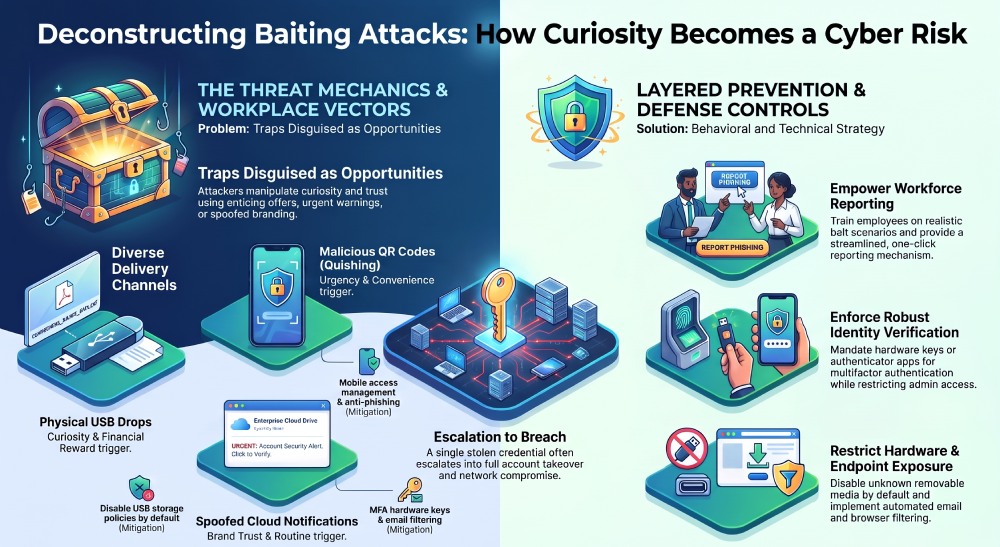
A baiting attack is a type of social engineering where an attacker offers something tempting to make a person click, download, scan, plug in, sign in, or share data. The bait may be digital, physical, or highly targeted.
Definition in plain English
In a workplace setting, a baiting attack is a trap disguised as a benefit, warning, file, device, or opportunity. Unlike brute-force hacking, this method depends on psychological manipulation. The attacker studies what employees want or fear, then wraps the trap in a believable story.
Common attacker goals
A baiting campaign usually aims to:
- Steal login credentials or session tokens
- Install malware through a malicious download
- Send employees to a fake website
- Capture personal information and financial information
- Gain access for account takeover
- Collect sensitive information for fraud, extortion, or identity theft
Why it belongs to social engineering
Social engineering succeeds when normal habits work against the employee. Opening a document, scanning a QR code, checking a payroll update, or claiming a reward can all feel routine. That is exactly why a baiting attack can bypass careful people.
Baiting versus phishing
Phishing usually starts with a message: email, SMS, chat, or social media. Baiting can include phishing, but it also includes infected devices, fake downloads, QR-code scams, and staged physical items.
Where the lines overlap
A malicious link in an email promising contest winnings is both baiting and phishing. A fake Google sign-in page that steals credentials can cause account takeover. A fake Tax Office impersonation message in Australia may target financial information, personal information, and sensitive information in one step.
Why Employees Take the Bait: Curiosity, Urgency, Rewards, and Trust Triggers
Attackers know employees are busy. They exploit speed, politeness, deadlines, and the desire to solve problems quickly.
Curiosity and reward triggers
Curiosity is powerful because people dislike information gaps. A file named “salary_adjustments.xlsx” or “confidential_restructure_plan.pdf” invites a click. A clickbait message promising a bonus, gift card, or “unclaimed benefits” can push even cautious employees toward a bad decision.
When rewards become traps
The bait often looks harmless:
- “Claim your staff voucher”
- “View your contest winnings”
- “Download your conference photos”
- “Open this shared Google Docs file”
- “Scan this QR code for your parking refund”
The fraud chain
One click may lead to malware, stolen credentials, and then account takeover. Once attackers control an account, they can search email for financial information, personal information, contracts, invoices, and other sensitive information.
Urgency and trust triggers
An urgent message works because people want to avoid consequences. “Your Google account will be suspended” or “Payroll details must be verified today” creates pressure.
Trust signals attackers copy
Attackers use:
- Spoofed branding from Google, Microsoft, banks, or the Australian Taxation Office
- Familiar sender names
- Fake IT help desk language
- A clean-looking fake website
- SMS links and QR codes
- Shared-file notifications
Why trust fails under pressure
When urgency meets trust, judgment narrows. An employee may enter credentials, approve a login prompt, or download malware before checking the sender. That single moment can lead to identity theft or account takeover.
Common Workplace Baiting Examples: USB Drops, Fake Downloads, QR Codes, and Phishing Links
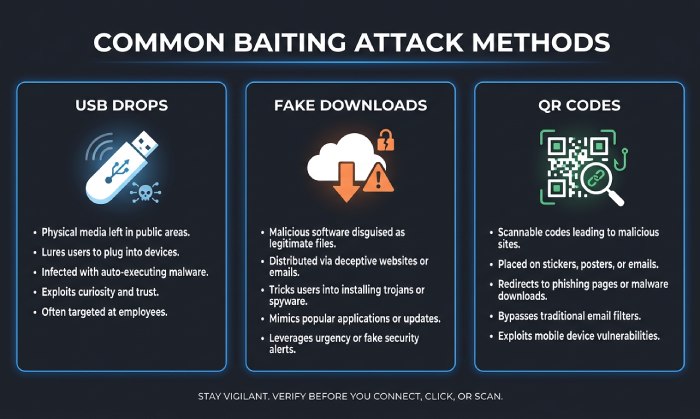
Workplace baiting comes in many forms. The best programs teach employees to recognize patterns, not just individual scams.
Physical baiting with USB drives
Physical baiting often uses a lost-looking USB drive. The label might read “Executive Bonuses,” “HR Layoffs,” or “Client Payments.” Someone plugs it in, and the device launches code or prompts a download.
Stuxnet as a warning
The Stuxnet attack, widely reported in security circles and covered by writers such as Nicole Perlroth of the New York Times, showed how removable media could help malware reach restricted systems, including Iranian nuclear facilities. Modern workplace attacks are usually less dramatic, but the lesson holds: a small device can cross big defenses.
Device rules matter
Clear device handling policies should tell employees not to connect unknown media. That rule must apply to office machines, contractor laptops, and bring-your-own-device (BYOD) environments.
Digital baiting through files, links, and QR codes
Digital baiting uses email, chat, ads, search results, file-sharing notices, and pop-up notification lures. Spear baiting goes further by tailoring the bait to a department, executive, project, or supplier.
Phishing links and fake portals
A phishing email may point to a fake website that mimics Google, Bitwarden, a payroll vendor, or an Australian Taxation Office page. In Tax Office impersonation scams, criminals often seek financial information, tax file details, and personal information for identity theft.
Quishing is growing
Quishing, or QR-code phishing, moves the malicious destination into a code. Employees scan it with a phone, land on a fake login page, enter credentials, and may expose a Google account or business system to account takeover.
Fake downloads and browser-based lures
A malicious download may claim to be an invoice viewer, meeting plugin, security update, or browser extension. Safer habits include using trusted web browsers such as Brave or Firefox, checking URLs carefully, and searching privately with tools like DuckDuckGo when verifying suspicious claims.
Browser warnings help, but not always
A Phishing filter, Antivirus, and modern Operating system controls can block known threats. Unknown bait can still get through, especially when the employee approves the action.
Business Risks of Baiting Attacks: Malware, Credential Theft, Data Breaches, and Compliance Impact
A single baiting attack can turn into a business incident within minutes. The first click is rarely the end.
Malware and network compromise
Attackers use malware to steal data, log keystrokes, open backdoors, or move across the Network. Once an Endpoint is infected, the attacker may look for shared drives, admin tools, cached credentials, and unsecured databases.
Security controls that reduce spread
Network security, firewalls, a well-tuned Firewall, segmentation, endpoint protection, encryption, and anti-malware tools reduce blast radius. A Sandbox can also isolate suspicious files before they reach production systems.
Why endpoint visibility matters
Security teams need to know which machine downloaded the file, what process ran, and what connections followed. Without that detail, investigation takes longer and mitigation becomes guesswork.
Credential theft and account takeover
Stolen credentials are among the most damaging outcomes of phishing and baiting. With valid access, attackers may bypass perimeter controls and appear to be a normal employee.
From one login to broad access
After account takeover, attackers can reset passwords, read email, approve payments, and harvest more sensitive information. They may use the account to send new phishing messages internally, where trust is higher.
Personal and financial fallout
Exposed personal information can support identity theft. Exposed financial information can support invoice fraud, payroll diversion, refund scams, and bank account abuse.
Compliance and legal exposure
A baiting incident can trigger breach notification duties, contractual penalties, regulatory reviews, and customer distrust. In Australia, for example, exposure of tax records, employee files, or customer personal information can create serious reporting obligations.
Data classes most at risk
High-risk data includes:
- Sensitive information such as health, identity, or employee records
- Financial information such as bank details and invoices
- Password vault data, even when stored in tools such as Bitwarden
- Customer records that could support identity theft
- Admin credentials that enable wider account takeover
How to Prevent Baiting Attacks: Security Awareness, Reporting Habits, Device Controls, and Testing
Prevention works best when people, process, and technology reinforce each other.
Train employees to pause and report
Security awareness training should show realistic bait, not cartoon scams. Teach staff to question unexpected files, unknown USB drive devices, QR codes, a free offer, and any request for credentials or financial information.
Reporting should be easy
Give employees one clear reporting path. A button in email, a chat channel, or a hotline works better than a long policy page. Fast reports improve containment, investigation, mitigation, and recovery.
Keep the message simple
If a message asks for sensitive information, creates urgency, offers a reward, or sends users to a fake website, report it before acting.
Strengthen identity and access controls
Use strong passwords, password managers such as Bitwarden, and multifactor authentication (MFA). Multifactor authentication should favor an Authentication app or Hardware security key over SMS where possible, though SMS is still better than no two-factor authentication.
Reduce the damage of stolen credentials
Limit admin rights, review access often, and monitor impossible travel, new devices, and risky sign-ins. These controls make account takeover harder and help detect it earlier.
Protect high-value accounts first
Start with finance, payroll, executives, IT admins, and anyone with access to personal information, financial information, or broad repositories of sensitive information.
Use layered technical defenses
Programs that pair phishing protection with email security filtering, anti-phishing tools, anti-malware tools, antivirus, browser protections, and endpoint detection can stop many baiting attempts before employees see them.
Test the controls
Run safe simulations for phishing, QR-code scams, fake downloads, and unknown media. Security teams can also use penetration testing providers or platforms such as Cobalt to validate controls against real-world social engineering techniques.
BYOD needs extra care
For BYOD and bring-your-own-device (BYOD) use, require device posture checks, patching, screen locks, encryption, and separation of business data. Personal devices should not become the weak path to business credentials.
Maintain an incident response plan
An incident response plan should define who handles containment, evidence collection, legal review, communications, mitigation, and recovery. Practice it before a real baiting attack hits.
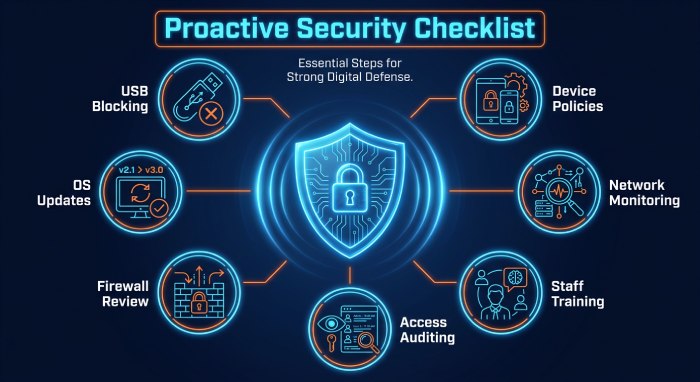
Proactive security measures to review regularly
Useful proactive security measures include:
- Blocking unknown USB storage by default
- Enforcing device handling policies
- Updating Operating system and browser versions
- Monitoring Network traffic for unusual behavior
- Reviewing Firewall and firewall rules
- Training staff on social engineering, phishing, and malware patterns
- Auditing access to systems that store personal information, financial information, and sensitive information
General Manager
General Manager of DuoCircle. Product strategy and commercial lead across DuoCircle's 2,000+ customer base.
LinkedIn Profile →Protect your inbox from phishing attacks
Real-time email security with 60-day free trial. No credit card required.